How to Make a Flamingo Float AI Video (Sky Pool Float Trend)
How to make a flamingo float AI video: scroll your phone on a pink float and drift off across a rooftop infinity pool, the sky pool float trend. From one photo.
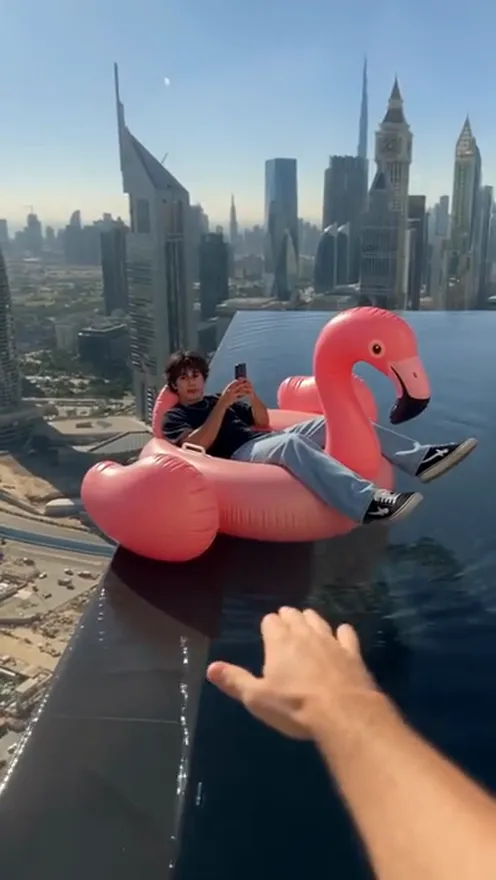
The flamingo float meme is a one-joke clip that works every time: someone lies on a pink float scrolling their phone while a hand from off-camera shoves them away from the edge. This guide explains where the clip comes from, what people mean by flamingo float, sky pool float and rooftop infinity pool float (it is all the same trend), and how to make a 11-second version starring you from 1 photo with the Flamingo Float AI template on Viberot. Credits are priced on the pricing page.
Where the trend comes from#
The original is a TikTok posted on 2 November 2026 that passed 24 million views and around 1.8 million likes within days. It is one unbroken shot of about 11 seconds on a skyscraper rooftop in Dubai: one person lies on a pink flamingo float at the edge of an infinity pool, looking at their phone with the city skyline behind them. A hand from off-camera reaches in and pushes the float away, and it drifts slowly across the water until the person is a tiny dot against the towers.
Why it went viral#
- A clean visual joke. A pink flamingo float on a rooftop pool above a skyline needs no explanation.
- The calm reaction. Being pushed away while staying glued to the phone is relatable.
- One shot, no edits. The slow drift and growing distance carry the punchline.
- Easy to caption. "Thank you bro" style captions, group-chat jokes and "my friends when I check my phone" all fit.
- Easy to swap in a person. One person, one float, one pool: perfect for putting yourself in the lead.
The shot, second by second#
The 11-second version follows the original:
- 0-3 s: the lounge. You lie on the pink flamingo float at the edge of the rooftop infinity pool, scrolling your phone, with the skyline behind you.
- 3-6 s: the push. A hand from off-camera reaches in and shoves the float away from the edge.
- 6-11 s: the drift. The float floats off across the water, getting smaller against the towers, with no cut.
You keep your own face, hairstyle and clothes from your photo. The rooftop pool and the flamingo float are fixed, and the original sound is mixed in.
Step by step: how to make it with AI#
- Open the template. Go to the Flamingo Float AI page and sign in.
- Upload one photo. A clear photo of you with the face visible, ideally full body.
- Pick the aspect ratio and quality. 9:16 is the default for TikTok, Reels and Shorts; 16:9 shows more of the skyline.
- Generate. There is no prompt to write. Rendering usually takes a few minutes.
- Check the audio and post. The file has the original sound mixed in, but that is not a music licence. When you post to TikTok you can swap in the same sound from its own library.
Picking a photo that works#
| Works well | Causes trouble |
|---|---|
| One person, face clearly visible | Group photos where faces are tiny |
| Full body or at least waist-up | Tight selfies with no body shown |
| An outfit you like, since you keep it | Costumes or masks that hide your face |
| Good light and a sharp image | Dark, blurry or heavily filtered photos |
Note
Photos that appear to show public figures, including actors, singers and influencers, are rejected before any credits are charged. Use photos of yourself or of friends who agreed to be in your video. Pets are not supported yet, and we cannot promise a date for a pet version.
Ideas for your post#
- "Thank you bro." Keep the classic energy and tag the friend who would push you.
- Sunday scroll. Caption it with how far you drift when you are deep in your phone.
- Group-chat caption. "Me ignoring everyone while the plans change" works on a floating flamingo.
- Holiday teaser. Post it before a trip as your pool-day mood.
How it differs from CapCut templates#
A CapCut template needs real footage of a rooftop pool and a pink float, and not many people have access to either. Here you upload one photo and the pool, the float, the skyline, the push and the sound are generated for you, with your face and outfit carried over. There is no timeline and no manual sound sync.
Price and FAQ#
A Standard 720p video costs 552 credits and 480p costs 250; credit packs start at $9.90 for 600 credits. Credits are a one-time purchase, with no subscription.
Does the video include sound? Yes, the original sound from the clip. This is an independent tool, not affiliated with the original creator, TikTok, or any artist or label, and it does not use any artist's voice or likeness. Audio in a file is not a music licence; when you post, you can swap in the same sound from TikTok's own library.
Can I use my pet? Not yet. This template is tuned for people, one per photo, and we cannot promise a date for a pet version.
Will I keep my own clothes? Yes, your face, hairstyle and outfit come from your photo.
What if the generation fails? Failed videos are refunded automatically and the credits go back to your balance.
Your flamingo float is waiting
Upload one photo and get your 11-second Flamingo Float video, ready to post.
From 89 credits · failed videos refunded · no subscription