How to Make a Christmas Lights Car AI Video From One Photo
How the Christmas lights car trend went viral, why wrapping your real paint risks scratches, and how to make a christmas lights car ai video from one photo.
Every December, car TikTok fills up with owners taping hundreds of tiny LED Christmas lights across their hoods, doors and roofs, then flipping the switch after dark for a glowing reveal. It looks great on camera — and it is miserable to actually do. Between hours of painter's tape, scratched clear coat, dead batteries and local road rules about coloured exterior lights, most drivers would rather not touch their paint. That's why the AI version took off: upload one photo of your car and watch your exact ride light up on a snowy winter night in a single 8-second take. This guide explains why the look works and how to make a christmas lights car ai video that actually keeps your real car.
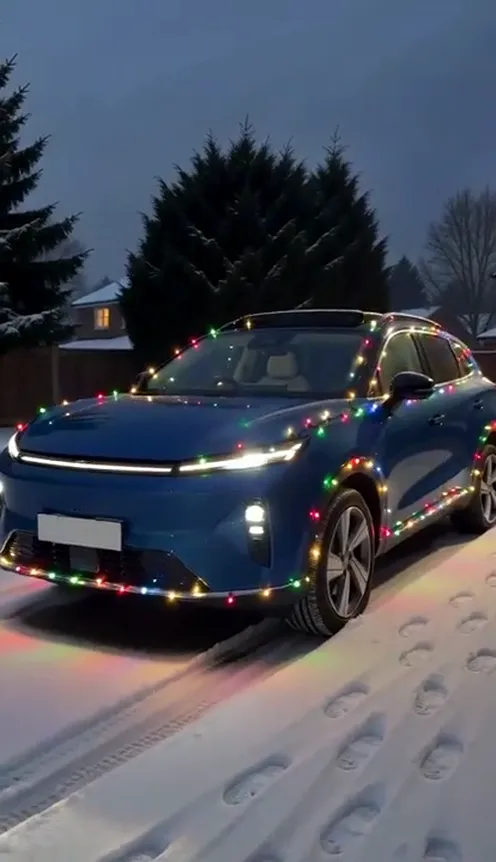
The clip below was made with the Christmas Lights Car AI video generator on Viberot.
Why the Christmas lights car trend blew up#
Real-life light-wrapped car clips hit millions of views every holiday season because the payoff is instant: a familiar everyday car suddenly turns into a rolling holiday display the second night falls.
The problem with filming it yourself is obvious:
- Clear-coat damage: adhesive tape and wind-whipped wires leave fine swirl marks on glossy paint.
- Hours of prep and cleanup: outlining every panel takes an afternoon, and peeling it back off in cold weather takes almost as long.
- Weather rarely cooperates: most viral car clips are filmed in dry suburban driveways, whereas the dream holiday shot has fresh snow falling through the glow.
The AI version solves all three at once. It keeps your car's actual body, paint colour and wheels, traces the body seams with neat micro-LED fairy lights, and moves the scene onto a quiet snowy driveway at night.
What happens in the shot#
Instead of choppy multi-angle cuts that morph your vehicle into a different model, the template uses one continuous 8-second arcing shot:
- The quiet winter setup: your car sits parked on a snow-dusted driveway under gentle falling snow, fine unlit fairy-light wires neatly outlining the hood, roof, doors and wheel arches.
- The light-up reveal: the headlights flick on and hundreds of colourful micro-LED Christmas lights illuminate across the body in sequence, bouncing warm red, gold, blue and green reflections onto the paint and white snow.
- The glowing arc: the camera glides smoothly along the visible three-quarter angle of your car, keeping your real headlights, grille, paint and wheels recognizable while snowflakes catch the coloured bokeh.
Because the camera stays around the angle shown in your photo rather than spinning behind the car, the AI never has to guess what the back of your vehicle looks like.
How to make your christmas lights car ai video#
The Christmas Lights Car AI template needs no editing and no prompts:
- Upload one clear photo of your car. A front or side three-quarter angle with the whole vehicle in frame gives the cleanest match for paint, wheels and headlights.
- Pick your aspect ratio and quality. 9:16 is built for TikTok, Instagram Reels and YouTube Shorts; 16:9 works for YouTube and widescreen showcases.
- Generate. Wait a few minutes for your 8-second MP4. It comes with AI-generated winter-night ambient sound already included.
- Post as is or add a holiday sound. Keep the quiet snowy ambience, or layer a licensed Christmas track directly inside TikTok or Reels when you upload.
Choosing the best car photo#
- Keep the entire car in frame. Avoid tightly cropped bumper or wheel shots so the lights can trace the full silhouette cleanly.
- Shoot in clear, even light. Daylight or bright overcast photos help preserve your true paint colour and wheel design before the scene shifts to winter night.
- Skip crowded parking lots. A clean driveway, street or open lot keeps neighbouring cars out of your snow scene.
- Cars, SUVs, pickups and vans all work. Licence plates are kept subtly snow-dusted and unreadable so you don't get garbled letters.
Caption and posting ideas#
- "Did I really spend 6 hours taping lights to my car? Not a chance."
- "My car is officially ready for December."
- Post a side-by-side Story: your daytime photo first, then the glowing snow-night clip.
- Making holiday clips with friends too? Pair your car reveal with the AI Christmas Pajama Dance, or try another car-only hit with AI Toy Car to Real Car.
Price and FAQ#
A 720p video costs 332 credits and 480p costs 157. Credit packs are one-time payments starting at $9.90 for 600 credits and never expire — see pricing. Failed generations are refunded automatically.
How many photos do I need? Just 1 photo of your car, ideally from a front or side three-quarter angle.
Does it include a Christmas song? No. The video has AI-generated winter-night ambient sound instead of a copyrighted track. If you want holiday music on top, add a licensed sound in TikTok or Reels when posting.
Will it swap my car for a different model? No. The template preserves your car's body shape, paint colour and wheels throughout the 8-second clip.
Ready to see your ride in holiday lights? Light up your car from a single photo.
Wrap your ride in holiday lights
Upload one photo of your car and get your 8-second snowy winter-night light-up reveal, no tape required.
From 51 credits · failed videos refunded · no subscription