How to Do the Perdon Trend With AI: From Rich Version to the Real You
How to do the Perdon trend with AI: where the perdón meme comes from, how the rich-to-real reveal works, and how to make it with you or your pet from a photo.

The Perdon trend is the internet admitting it lied. First you post the flawless, filthy-rich version of yourself or your pet. Then you take the edits away, one by one, until the real photo is left — ordinary room, ordinary clothes, slightly awkward face — with one word: "Perdón." Sorry. It started as a Spanish-language photo carousel on TikTok in October 2026 and it is now one of the most copied formats on the app. This guide covers where it comes from, why it works, and how to make it as a single video from one photo.
Every clip in this post was made with the Perdon AI generator on Viberot.
Where the Perdon trend comes from#
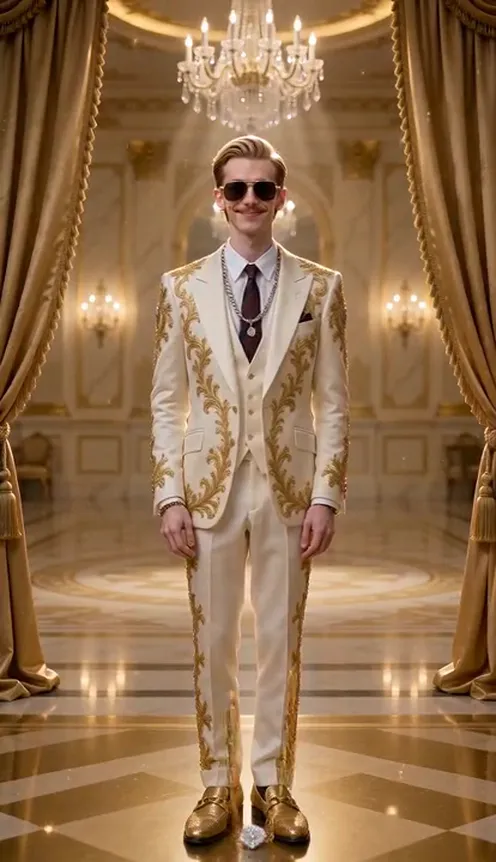
The format. The original posts are TikTok slideshows. Slide one is an AI-perfected picture with a caption like "Este soy yo" — this is me. Each following slide removes one improvement and says "Mentira, no está tan…" — lie, it's not that… The last slide is the untouched photo and the caption "Perdón" or "Lo siento."
The spread. It took off in Argentina in mid-October 2026 and moved through Mexico and Chile within days. A post of a chihuahua going from glamorous to very much not passed 9 million views and 2.7 million likes on 17 October, and by 18 October TikTok search was full of "perdon trend de fotos ia" tutorials.
The material. Two kinds of photos dominate: pets, and throwback photos of people as kids — Halloween costumes, school plays, bad haircuts. Both are funny precisely because the real version is so ordinary.
Why it works#
The joke is the gap. The bigger the fantasy at the start, the harder the landing at the end — and the ending has to be real, because everyone recognises that kitchen, that sofa, that haircut. It is also self-deprecating rather than mean: you are making fun of yourself (or of your very unglamorous dog), which is why people share it.
What happens in the video#
The Viberot version turns the slideshow into one continuous 10-second shot. The camera never moves, so the before and after line up exactly:
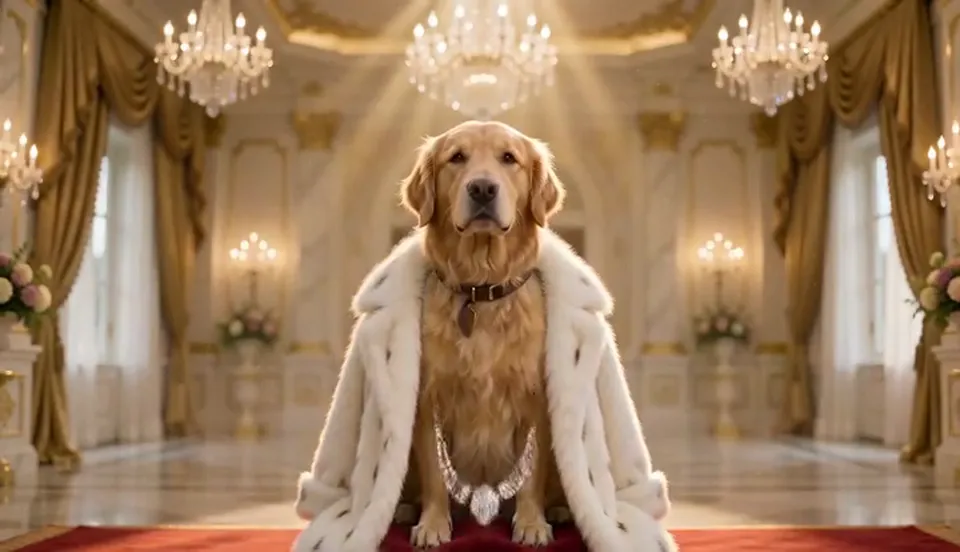
- The rich version. You, in the same pose as your photo, inside a gold-and-marble palace with a crystal chandelier, velvet curtains and a red supercar behind you. Crown, sunglasses, gold chains, diamonds, champagne, a white fur coat or a gold-embroidered suit. Pets sit on a red velvet throne with a crown and a diamond collar.
- It all goes, one by one. Crown, sunglasses, champagne, jewellery, supercar, chandelier, curtains, the palace itself, then the outfit and the hair — each vanishes with its own little poof.
- The real you. The last shot is the scene from your photo: same place, same clothes, same hair, same light, and a guilty little smile.
The sound is generated with the clip: over-the-top luxury music, a poof for every item, then a record scratch and one awkward cricket chirp.
How to do the Perdon trend with AI#
- Open the template. Go to the Perdon AI page and sign in.
- Upload one photo. Yourself, a throwback of you as a kid, or your pet, facing the camera. Waist-up or full body works best.
- Choose the format. 9:16 for TikTok, Reels and Shorts, or 16:9 for YouTube.
- Generate. It takes about two to three minutes and you get a 10-second MP4 with sound.
- Add the caption and post. The video has no text, so add your own: "Este soy yo… mentira… perdón" works in any language.
Tip
The more ordinary the photo, the better the punchline. A messy bedroom beats a nice holiday shot.
Picking a photo that works#
| Works well | Causes trouble |
|---|---|
| One person or one pet facing the camera | Group photos, side profiles |
| An everyday setting: kitchen, sofa, backyard | Photos that already look glamorous (no contrast) |
| Waist-up or full body | Extreme close-ups with no clothes or background visible |
| Clear, evenly lit | Very dark or heavily filtered photos |
Note
Photos that appear to show public figures are rejected before any credits are charged. Use photos of yourself, your own kids as their parent, your pet, or people who agreed.
Ideas for your post#
- The throwback. Your school photo from age eight, upgraded to billionaire, then back to the bowl cut. Caption: "Este era yo… mentira… perdón."
- The pet. The dog on a throne with a crown, ending on the dog asleep on the laundry pile.
- The group chat. One for every friend, posted back to back.
- The reply. Stitch it under someone else's Perdon slideshow: "I made mine move."
Perdon AI vs. CapCut templates#
The CapCut templates and photo tools make the AI-perfect picture, but you still have to assemble the slideshow, write the captions and pick the sound yourself. The Perdon AI generator builds the whole reveal into one video — the rich version, the items vanishing one at a time, and an ending made from your own photo — in the browser, with the sound effects already on it.
How much it costs#
A Standard 480p Perdon video costs 64 credits and 720p costs 137; the exact price is always shown next to the Generate button. Credit packs are one-time payments — no subscription — start at $9.90 for 600 credits and never expire. Failed generations are refunded automatically. See the pricing page.
Frequently asked questions#
What does "perdón" mean in the trend?#
It is Spanish for "sorry". The caption apologises for the AI-perfect version you just showed and admits the ordinary photo is the real one.
Does the video include the trend's TikTok sound?#
No. It comes with generated music and sound effects. If you want the sound from the original posts, add it from TikTok's sound library when you post.
Can I use my dog or cat?#
Yes. Pets get the velvet throne, crown and diamond collar, then end up back wherever the photo was taken.
Can I use a photo of myself as a kid?#
Yes — throwbacks are one of the most popular versions. Only upload photos of yourself, your own children as their parent, or people who agreed.
Is this affiliated with TikTok?#
No. Viberot is an independent AI video tool and is not affiliated with TikTok, CapCut or the creators who started the trend.
Are there other trends like this?#
Yes. Try ChatGPT Millionaire AI or the Super Money filter, both from one photo.
Show them the rich version. Then say perdón.
Upload one photo and get your rich-to-real reveal in 10 seconds, sound included.
From 64 credits · failed videos refunded · no subscription