How to Do the iPhone Kupi Dance AI Trend (iPhone Duo Dance From One Photo)
How to do the iPhone Kupi dance AI trend (aka iPhone Duo): where the sound comes from, every unfold and the toss second by second, and how one photo makes it.

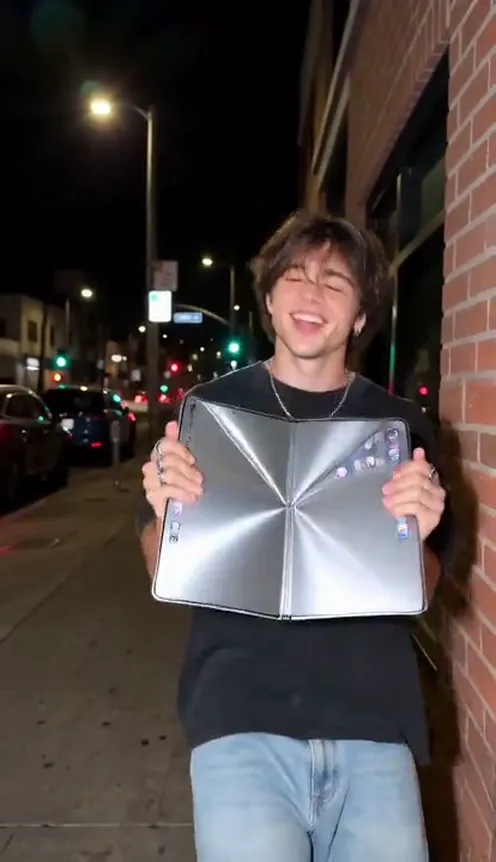
The iPhone Kupi dance is the clip where someone raps into a phone, snaps it open into a double screen, opens it again into a tablet the size of a tray, shakes it, hurls it out of frame and then dances like the floor is on fire. It took four days to go from one TikTok to a CapCut template with your face in it, and people now search for it as iPhone Kupi, iPhone Duo or "iphone cupin". This guide covers where it comes from, what happens in each second, and how to make a 15-second version of yourself from 1 photo with the iPhone Kupi Dance AI template on Viberot, in your own clothes and your own room instead of the hotel room everyone else is pasted into.
Where the iPhone Kupi dance comes from#
The original. On TikTok, creator Coco Vex (@thecocovex) posted a 15-second vertical clip captioned "Iphone cupin #iphoneduo": one person in a night-time hotel room with a floor-to-ceiling window and a beige sofa, phone to the mouth, unfold, unfold again, shake, toss, freak-out. Four days later it had 16.4 million views, 1.1 million likes and nearly 200,000 shares.
The sound. The audio is her own "original sound", a deadpan rap-style ramble about a phone that keeps growing. It is not a label release from the music library, which is part of why it spread so fast: within four days close to 2,000 videos were using it.
The template. CapCut creators turned it into an upload-one-photo template almost immediately. Tutorials titled "iphone kupi dance", "iphone kupi ai dance" and "iphone kupi duo dance" walk people through putting their own face on the dancer, and the remakes keep the same hotel room, the same lamp light and the same beige sofa. One of the biggest template remakes passed a million views on its own.
Why it went viral#
- The prop is the joke. A phone that unfolds into a double screen and then into something the size of a serving tray is absurd on sight, and every unfold raises the stakes.
- It escalates. Talk into it, open it, open it more, shake it, throw it, lose your mind. The structure tells you exactly when to laugh.
- The dance needs no skill. The last five seconds are pure flailing. Anyone can do it, and nobody can do it wrong.
- One person, one phone. No partner, no outfit change, no set. That is why the template version took off: one photo is enough.
- The sound is a creator sound. It is tied to the clip rather than to a chart song, so every remake points back to the same meme.
The dance, second by second#
Here is what the 15-second version you get looks like:
- 0–1.5s: The phone call. Medium close-up. You hold the phone upright at your mouth, screen to the camera, like you are rapping into it.
- 1.5–3s: The first unfold. Both hands snap the phone open into a double-wide folding screen held in front of your face, only your eyes showing above it.
- 3–4s: The shimmy. You lower it a little, shake your hands open, shrug and wiggle, clearly delighted with yourself.
- 4–5.5s: The big unfold. You open it again into a tablet the size of a tray and hold it against your chest. It covers your whole upper body.
- 5.5–7s: The shake. Both hands grip the giant tablet and rattle it while the screen flashes silver.
- 7–9.5s: The back-step. Hugging the tablet, you sway your hips and step backwards until your whole body is in frame.
- 9.5–10.5s: The toss. Both hands fling the tablet straight up and out of the shot, spinning as it goes.
- 10.5s to the end: The freak-out. Arms flailing, head whipping, hips going, a half spin on the spot, until the clip ends.
The finished file already has the trend's original sound on it, lined up with the unfolds and the toss, so you can post it as it is.
Step by step: how to do the iPhone Kupi dance with AI#
- Open the template. Go to the iPhone Kupi Dance AI page and sign in.
- Upload one photo. A clear photo of one person, ideally full body and facing the camera.
- Pick the aspect ratio. 9:16 for TikTok, Reels and Shorts, or 16:9 for YouTube.
- Pick a quality. Standard 480p or 720p is enough for social. Higher tiers give more detail and cost more.
- Generate. No prompt to write: the phone, the unfolds, the toss and the timing are already set. Rendering usually takes a few minutes.
- Download and post. You get a 15-second MP4 with the sound already on it. Post it.
Picking a photo that works#
| Works well | Causes trouble |
|---|---|
| One person, full body, facing the camera | Group photos where the face is tiny |
| Hands visible and empty | Hands already holding a phone, bag or drink |
| Plenty of room around you to step back | Extreme close-ups of only the face |
| Even light, sharp focus | Heavy filters, very dark or blurry photos |
- You keep your own clothes. The AI keeps the outfit from your photo, pyjamas included.
- You keep your own background. The scene stays the place in your photo; a plain wall stays a plain wall, your kitchen stays your kitchen.
- The phone is added. It starts as a normal phone in your hand and grows from there. You do not need one in the photo.
Note
Photos that appear to show public figures or celebrities are rejected before any credits are charged. Use photos of yourself or people who agreed to be in your video.
Ideas for your post#
- The literal caption. "iphone kupi" or "my phone when the update finishes" is all it needs.
- Office edition. Use a photo at your desk in work clothes; the back-step past the printer is the joke.
- Family chat. Make one of your dad (with his permission) and send it with no explanation.
- Before and after. Post the original sound's clip as a duet or stitch, then cut to yours.
- Keep the dance series going. Pair it with the Tung Tung Tung Sahur duo dance or the Wipe Me Down dance for a run of dance clips.
- Hashtags. #iphoneduo and #iphonekupi are where people are already watching.
iPhone Kupi Dance AI vs. the CapCut template#
The CapCut route pastes your face onto the dancer in the original hotel room. Everyone's remake has the same night window, the same beige sofa and the same black outfit, and the face often slips during the toss and the freak-out.
The iPhone Kupi Dance AI template makes a new video from your photo instead:
- Your room, not the hotel room. The background is wherever your photo was taken.
- Your clothes. You wear what you had on in the photo, not the template's outfit.
- The whole routine, in sync. Phone, double screen, giant tablet, toss and freak-out happen at the same beats as the original.
- No app to install. It runs in the browser on your phone or computer.
- Two aspect ratios. 9:16 vertical or 16:9 widescreen.
How much it costs#
A Standard 720p iPhone Kupi video costs 594 credits; 480p costs 270. Higher tiers cost more, and the exact price is always shown next to the Generate button before you start. Credit packs are one-time payments, not a subscription. They start at $9.90 for 600 credits and never expire. If a generation fails, the credits go straight back to your balance. See the pricing page for details.
Frequently asked questions#
What is the iPhone Kupi dance trend?#
A TikTok meme from late October 2026 where someone raps into a phone, unfolds it into a double screen, unfolds it again into a giant tablet, throws it away and dances. It is also tagged iPhone Duo and "iphone cupin". The AI version makes the whole 15-second routine from one photo.
Is this connected to Apple?#
No. Viberot is an independent AI video tool and is not affiliated with, endorsed by or licensed by Apple or any phone maker. The phone that keeps unfolding is a comedy prop the trend invented, not a real product, and no logos appear in the video. The name is only used to describe the meme people search for.
How much does it cost?#
270 credits at 480p and 594 credits at Standard 720p. The price is shown before you generate.
How many photos do I need?#
- One clear photo of one person.
Can two people be in it?#
No. Like the original, it is a solo. If you want a version with a friend, make one video each.
Can I use my pet?#
Not at launch. The template is made for one person holding and unfolding the phone.
Does it include the sound?#
Yes. The 15-second section of the creator's original sound from the trend is added to the file. Viberot is not affiliated with the creator who uploaded the sound, any artist or label, or the CapCut template authors. Having audio in a downloaded file is not a music licence: follow the music rules of the platform you post on and its rules on labelling AI-generated content, and swap in the official sound from the app's library if asked.
Which photos are rejected?#
Photos that appear to show public figures or celebrities are blocked before any credits are charged, and explicit images are always blocked.
Your turn to unfold the phone
Upload one photo and get your 15-second iPhone Kupi dance, in your own clothes and your own background, with the trend's original sound already on the file. Viberot is an independent AI video tool, not affiliated with the creator of the sound, any artist or label, Apple or any phone maker. The growing phone is a comedy prop, not a real product.
From 95 credits · failed videos refunded · no subscription