How to Do the Enchantress Filter Trend Without CapCut
How to do the Enchantress Filter trend: where the CapCut moon witch template comes from, the clip second by second, and how one photo makes your own version.
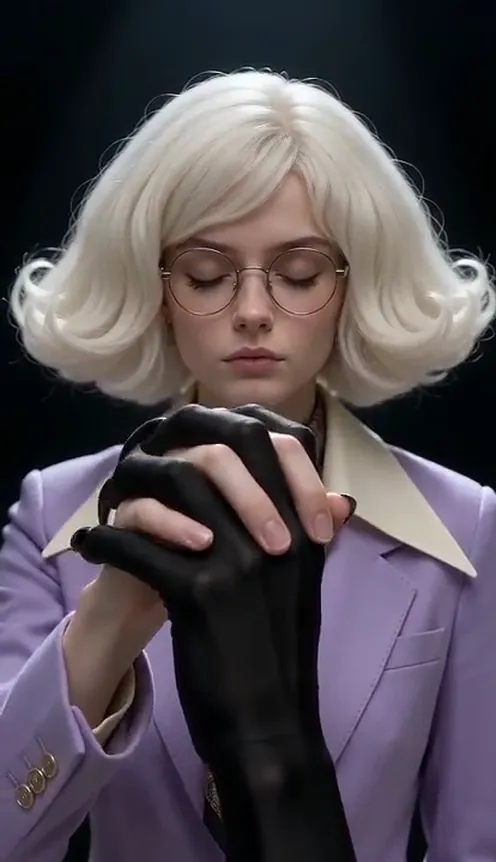
The Enchantress Filter is the CapCut template all over TikTok this Halloween. Eyes closed on a pitch-black background, you hold out one hand. A slender jet-black hand with long claws rises from the bottom of the frame, laces its fingers through yours and sweeps straight into the lens. The screen goes black, and when it clears you are a moon witch with a gold crescent crown, black lips and black hands, staring into the camera before you raise a finger to your lips: shh. This guide covers where the trend comes from, why it works, and how to make a 10-second version from 1 photo with the Enchantress Filter AI generator on Viberot, keeping your own face and hair.
Where the Enchantress Filter comes from#
The trend is a CapCut AI template called Enchantress Filter 1, published by a UK template creator on October 16, 2026 with two AI-made demo clips. Within days, template promo accounts in the US were posting it in bulk, and from October 20 Spanish-speaking TikTok picked it up as Filtro Hechicera 1. The biggest user clip, from Mexico, passed 400,000 views in two days. You will also see it shared as the moon witch filter or the dark moon goddess filter.
Every version uses the same structure: a calm closed-eyes portrait, a creepy shadow hand, a wipe to black and a witchy reveal that ends with a hush.
Why it went viral#
- The hand is genuinely creepy. A clawed black hand rising out of nowhere to hold yours is the kind of beat that stops a scroll.
- It is a glow-up. Before: plain portrait. After: crown, dark makeup and embers. Transformation clips always get rewatched.
- The shh is a perfect ending. It is mysterious, a little flirty, and it loops cleanly back to the start.
- It is Halloween season. It works as a costume reveal without buying a costume.
- It is one photo. No dance to learn and no friends to rope in.
The clip, second by second#
Here is the 10-second version you get:
- 0–1s: Eyes closed. You face the camera, eyes calmly closed, one hand held out flat in front of you. Black claw tips appear at the bottom of the frame.
- 1–2.5s: The shadow hand rises. A slender jet-black hand with long pointed nails rises toward yours. It belongs to an unseen shadow; no one else ever appears.
- 2.5–4.2s: Fingers lock. The black fingers slide between yours and grip.
- Around 4.4s: The wipe. Both hands sweep into the lens and the screen goes black.
- 4.5–7.5s: The reveal. You are back as a moon witch: an antique gold crescent crown with tiny dangling moons, black lips with a thin black line down the chin, a bone-tooth collar, a high-necked black lace gown and black clawed hands, with orange embers drifting behind you.
- 7.5s to the end: Shh. You raise one black finger to your lips and hold it to the last frame.
The clip comes with the trend's original sound (original sound - ArtemisCC), lined up with the wipe and the reveal. You can make it vertical 9:16 for TikTok, Reels and Shorts, or widescreen 16:9 for YouTube.
Step by step: how to do the Enchantress Filter trend#
- Open the template. Go to the Enchantress Filter AI page and sign in.
- Upload one photo. A clear, front-facing photo of yourself from the chest up works best.
- Pick the aspect ratio. 9:16 for TikTok and Reels, 16:9 for YouTube.
- Pick a quality. Standard 480p or 720p is enough for TikTok. Higher tiers give more detail and cost more.
- Generate. No prompt to write. The black background, the shadow hand, the wipe, the crown and the shh are already set. Rendering usually takes a few minutes.
- Download and post. You get a 10-second MP4 with the trend's original sound included.
Picking a photo that works#
| Works well | Causes trouble |
|---|---|
| One person, chest up, face clearly visible | Group photos or full-body shots where the face is tiny |
| Front-facing, good light, sharp focus | Sunglasses, masks, faces turned away |
| A hairstyle and eye colour you want to keep | Heavy beauty filters, very dark or blurry photos |
| A plain or simple background | Hands or objects covering the face |
- Your face is the point. The original template turns everyone's eyes white and gives them long black braids, so people often cannot recognise themselves. This version keeps your own eye colour, hair colour and hairstyle, so a clear face photo pays off.
- Chest up is the sweet spot. The crown, the necklace and the hands all need room in the frame.
- Any outfit works. You start in your own clothes and end in a high-necked black lace gown.
Note
Photos that appear to show public figures or celebrities are rejected before any credits are charged. Use a photo of yourself or of someone who has agreed.
Ideas for your post#
- Before and after. "Me on October 1 vs me on October 31" is the obvious caption.
- Make it a duet. Post your version next to a friend's and let people vote on the better witch.
- Keep the original sound. The clip already has the trend's original sound, so it sits naturally next to the other Enchantress Filter posts.
- Lean into the mystery. "Don't take the hand" or "She was warned" sends people to the comments.
- Use the hashtags. #enchantressfilter, #enchantresstrend and #moonwitch put your clip next to the ones people are already watching.
Enchantress Filter AI vs. the CapCut template#
The CapCut template restyles your photo frame by frame. It needs the app, it changes your face and hair a lot, and the result often looks like a different person wearing your outfit.
The Enchantress Filter AI generator makes a new video around your photo:
- No app to install. It runs in the browser on your phone or computer.
- Still you. Your face, eye colour, hair colour and hairstyle stay the same through the whole transformation.
- Made in one go. Upload, generate, download. No editing timeline.
- Two aspect ratios. 9:16 vertical or 16:9 widescreen, picked before you generate.
- Original sound included. The trend's sound is already lined up with the wipe and the reveal.
How much it costs#
A Standard 720p Enchantress Filter video costs 167 credits; 480p costs 81. Higher tiers cost more, and the exact price is always shown next to the Generate button before you start. Credit packs are one-time payments, not a subscription. They start at $9.90 for 600 credits and never expire. If a generation fails, the credits go straight back to your balance. See the pricing page for details.
Frequently asked questions#
What is the Enchantress Filter?#
A CapCut AI template, Enchantress Filter 1, that went viral on TikTok in October 2026. A clawed black hand takes yours, wipes the screen, and you reappear as a moon witch who hushes the camera. In Spanish it is called Filtro Hechicera.
Do I need CapCut?#
No. The Viberot version runs in your browser and generates the whole clip from one photo.
How much does it cost?#
81 credits at 480p and 167 credits at Standard 720p. The price is shown before you generate.
How many photos do I need?#
- A clear, chest-up photo of one person works best.
Will my eyes turn white?#
No. Your own eye colour, hair colour and hairstyle are kept, so you are still recognisably you after the reveal.
Does it include the original sound?#
Yes. The video comes with the trend's original sound from the template creator's TikTok post, lined up with the wipe and the reveal. Viberot is an independent tool and is not affiliated with, sponsored or endorsed by CapCut, TikTok or the template's creator, and does not use anyone's voice or likeness. Having audio in the file does not mean you hold a music licence, so follow your platform's music rules or swap in a library sound when you post. Follow your platform's rules on labelling AI-generated content.
Can I use my pet?#
This template is made for people. The closed eyes, the interlocked fingers and the shh all need a human face and hands.
Which photos are rejected?#
Photos that appear to show public figures or celebrities are blocked before any credits are charged, and explicit images are always blocked. Uploading your own video is not supported.
Are there other Halloween templates like this?#
Yes. Try AI Witch Transformation for a playful pointed-hat witch with a cauldron, or the AI Vampire Transformation for another dark glow-up.
Close your eyes. Take the hand.
Upload one photo and let the shadow hand pull you into the Enchantress Filter — you come back as the moon witch, still you.
From 81 credits · failed videos refunded · no subscription