How to Do the Closed on Sunday AI Trend (From One Photo)
How to do the Closed on Sunday AI trend: stand perfectly still in the middle of a huge singing choir on a sunny hillside, from one photo, in your own clothes.
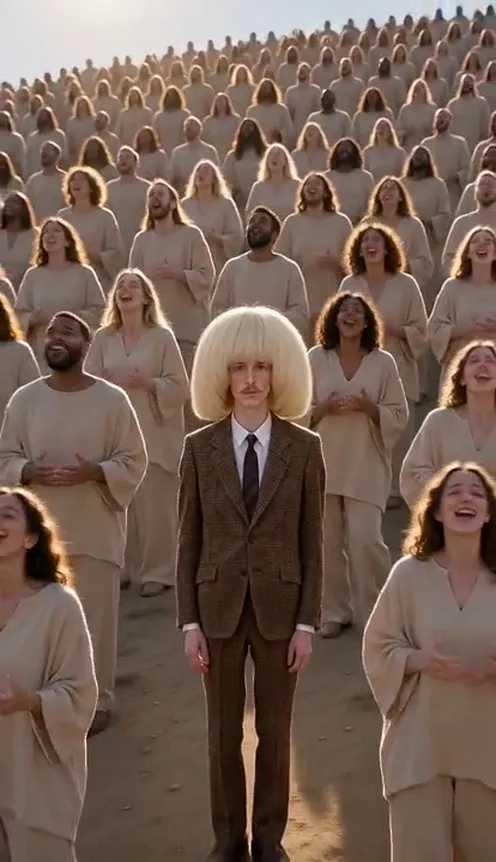
The Closed on Sunday AI trend is the calmest video on TikTok right now. One person stands dead still in the middle of a gigantic gospel choir on a sunny hillside, completely deadpan, while hundreds of singers sway, clap and raise their hands to the sky around them. Then the camera slowly pulls back until the choir covers the whole hill. This guide covers where the trend comes from, why it spread, and how to make a 10-second version starring you from 1 photo with the Closed on Sunday AI template on Viberot.
Where the Closed on Sunday trend comes from#
The trend recreates the closing scene of the "Closed on Sunday" music video from 2019. In that ending, one figure stands on a hillside while a huge choir in sand-coloured robes sings and moves around them, filmed from high up as the camera pulls away.
In mid-October 2026, creators started making AI versions of that shot with someone else in the middle: a guy in a suit, a grandma, a kitten in a choir of cats. A CapCut template followed within a day, and the format spread from there. Seasonal versions with skeleton or pumpkin-head choirs showed up around Halloween, but the classic look, one still person in a sea of beige robes, is what most people post.
Why it went viral#
- Stillness is funny. Everyone around you is in full worship mode and you are just... standing there.
- It is instantly recognisable. The beige robes, the hillside and the slow pull-back read as "that music video" in half a second.
- Main-character energy. The whole crowd seems to be singing for you.
- Caption bait. "Me at the family reunion when they ask about my job" writes itself.
- Works for anyone. Your dad, your best friend, your boss (with permission), you.
The shot, second by second#
Here is what the 10-second version you get looks like. It is one continuous high-angle shot, like the original:
- The opening. You stand in the centre, framed from head to knees, arms at your sides, calm and deadpan. The choir is packed tightly around you, swaying and clapping.
- The pull-back. The camera slowly pulls back and rises. You get smaller in the middle while more and more singers appear, hands raised, heads tilted up.
- The wide shot. The choir covers the whole sunny hillside, and you are still standing in the exact centre, the only person not in a robe.
You wear the outfit from your photo. The setting is always the choir on the hillside, so the background of your photo is not used. The clip comes out silent; add the trending sound in TikTok or CapCut when you post. The example on our page plays it as a preview only.
Step by step: how to do the Closed on Sunday AI trend#
- Open the template. Go to the Closed on Sunday AI page and sign in.
- Upload one photo. A clear photo of one person, face visible. Full-body or head-to-knees works best.
- Pick the aspect ratio. 9:16 for TikTok, Reels and Shorts, or 16:9 for YouTube.
- Pick a quality. Standard 480p or 720p is enough for social. Higher tiers give more detail and cost more.
- Generate. No prompt to write: the choir, the setting and the camera move are already set. Rendering usually takes a few minutes.
- Add a sound and post. You get a silent 10-second MP4. Add the trending sound in TikTok or CapCut and post it.
Picking a photo that works#
| Works well | Causes trouble |
|---|---|
| One person, face clearly visible | Group photos where the face is tiny |
| Full body or head to knees in frame | Extreme close-ups of the face only |
| Even light, sharp focus | Heavy filters, very dark or blurry photos |
| An outfit that stands out from beige | A beige or khaki outfit that blends into the choir |
| Standing, relaxed pose | Sitting, lying down or mid-jump |
- Your outfit stays yours. You are the only person not in a choir robe, so a colourful or dark outfit pops in the wide shot.
- Your face is clearest at the start. The opening frames are close enough to show it before the camera pulls back.
- People only for now. The template is tuned for one person; pet photos are not tuned for it yet.
Note
Photos that appear to show public figures, including actors, singers and influencers, are rejected before any credits are charged. Use photos of yourself or of friends who agreed to be in your video.
Ideas for your post#
- The classic. "Me standing still while everyone else has a breakthrough."
- The office version. "Me in the meeting when they say 'any questions?'"
- The Sunday reset. Post it on a Sunday with "Closed on Sunday, see you Monday."
- Pair it with another trend. Follow it with the AI Angry Dance Filter for a mood swing from calm to chaos.
- Hashtags. #closedonsunday, #closedonsundaytrend and #aitrend put your clip where people are already watching.
Closed on Sunday AI vs. the CapCut template#
The CapCut template drops a still photo or a short clip of you into the scene, and it runs in the CapCut app.
The Closed on Sunday AI template makes the whole shot from one photo in the browser:
- No filming. One photo in, a finished shot out.
- No app to install. It runs on your phone or computer.
- Still you. Your face and outfit stay the same in every frame.
- The real shot. Still centre, swaying choir and the slow high-angle pull-back, framed like the viral original.
- Two aspect ratios. 9:16 vertical or 16:9 widescreen.
- No watermark. The file is clean and silent, ready for a sound from the platform library.
How much it costs#
A Standard 720p Closed on Sunday AI video costs 137 credits; 480p costs 64. Higher tiers cost more, and the exact price is always shown next to the Generate button before you start. Credit packs are one-time payments, not a subscription. They start at $9.90 for 600 credits and never expire. If a generation fails, the credits go straight back to your balance. See the pricing page for details.
Frequently asked questions#
What is the Closed on Sunday AI trend?#
A TikTok trend from mid-October 2026 where AI videos recreate the ending of the "Closed on Sunday" music video: one person stands still in the middle of a huge singing choir while the camera pulls back. The AI version on Viberot puts you in the centre, from one photo.
How much does it cost?#
64 credits at 480p and 137 credits at Standard 720p. The price is shown before you generate.
How many photos do I need?#
- One clear photo of one person, ideally full body.
Will I keep my clothes?#
Yes. You wear the outfit from your photo; everyone else wears a choir robe. The setting is always the choir on the hillside.
Does it include the original song?#
No. The video is silent, with no song and no AI audio. The music in the example on the page is a preview only. Add the trending sound in TikTok or CapCut when you post, so it plays under the platform's licence. Audio in a downloaded file is never a music licence. Viberot is an independent tool, not affiliated with the artist, his label or the choir, and it does not use any artist's voice or likeness. Follow your platform's rules on labelling AI-generated content.
Can I make it with a celebrity photo?#
No. Photos that appear to show public figures are blocked before any credits are charged, and explicit images are always blocked.
Be the still one in the choir
Upload one photo and get your 10-second Closed on Sunday AI video, ready to post.
From 64 credits · failed videos refunded · no subscription