GTA 6 AI Video: How to Put Yourself in a GTA 6 Getaway Trailer From One Photo
Make a GTA 6 AI video from one photo: you drive a convertible across Vice City with cops and a helicopter on your tail. Steps, photo tips and post ideas.
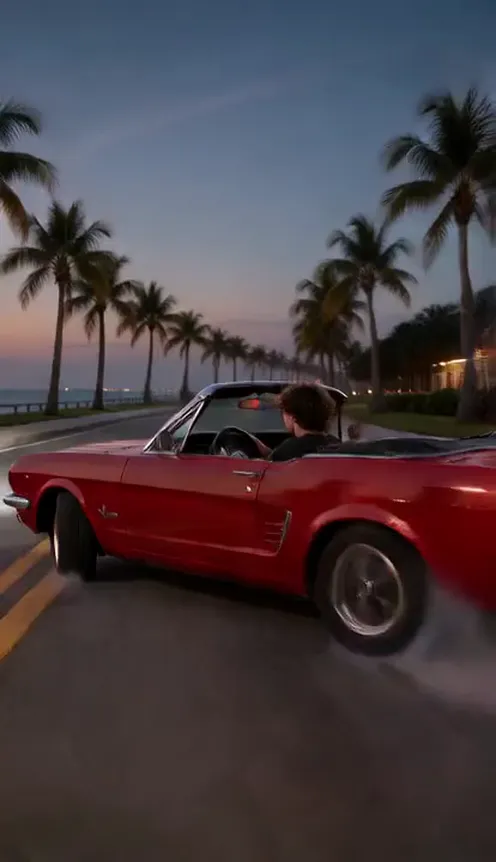
A GTA 6 AI video is the clip where you, not a game character, are the one behind the wheel in Vice City: a red open-top muscle car flying across a Miami causeway at sunset, police lights in the mirror, a helicopter searchlight overhead and one last grin at the camera before you vanish into neon Ocean Drive. It looks like a next-gen game trailer, and it is made from a single photo of you. This guide covers why everyone is making one this week, what happens shot by shot, and how to make your own.
The clips in this post were made with the GTA 6 Getaway AI generator on Viberot, an independent tool that makes videos in a GTA-inspired style. It is not affiliated with, endorsed by or licensed by Rockstar Games or Take-Two Interactive.
Why everyone wants to be in GTA 6 right now#
The release. GTA VI comes out on 19 November 2026, after years of trailers, leaks and memes. Searches like "GTA 6 trailer", "put yourself in GTA 6" and "GTA 6 AI" climb every time there is news, and launch week is the biggest moment of all.
The fantasy. Every GTA trailer sells the same feeling: sunset, palm trees, a fast car and a getaway that is a little too fun. Watching it, the obvious question is "what would I look like in there?"
The format. AI video can now produce photorealistic, game-looking footage with sound. That turns "me in GTA 6" from a photoshopped loading screen into a moving trailer you can post.
Why it works#
- Main-character energy. You are not a face pasted on a game model — you are the driver, in your own clothes, in every shot.
- It looks like real gameplay. Photorealistic open-world graphics, fast cuts and a shaky handheld camera read as a trailer, not a filter.
- Perfect timing. Everyone's feed is full of GTA VI this week. A clip of a friend outrunning the cops in Vice City rides that wave.
- It is short and loud. 10 seconds, engine roar and sirens from the first frame — made for a scroll-stopping post.
The trailer, shot by shot#
The video is 10 seconds long and cuts between four shots:
- The causeway chase. A low tracking shot alongside your red open-top muscle car as it tears across a long, flat causeway just above the water, police cars flashing close behind.
- The drift. Inside the car, you grip the wheel and throw it sideways around a palm-lined corner, tires smoking.
- The helicopter. A police helicopter swoops overhead and pins the convertible in its searchlight.
- The look back. You glance over your shoulder at the camera with a confident grin as the car roars away into neon-lit Ocean Drive.
The car is an original retro convertible muscle car, not a real model, and there is no game UI or on-screen text — just you, the chase and the city.
How to make a GTA 6 AI video#
- Open the template. Go to the GTA 6 Getaway AI page and sign in.
- Upload 1 photo. A clear photo of yourself with your face fully visible.
- Choose the format. 9:16 for TikTok, Reels and Shorts, or 16:9 for YouTube.
- Generate. It usually takes two to four minutes. You get a 10-second MP4 with generated sound: engine roar, screeching tires, sirens and the helicopter overhead.
- Post it. There is no music on the clip, so add a track from your platform's sound library if you want one.
Choosing a photo that works#
The AI keeps your face, hair and clothes from the photo, so the photo decides how convincing the trailer looks.
| Works well | Causes trouble |
|---|---|
| One person, face clearly visible | Group photos, pets, side profiles |
| Good light, sharp focus | Sunglasses, heavy filters, very dark photos |
| Waist-up or full body | Tight face crops with no outfit visible |
| A Vice City outfit: open shirt, tank top, bold colours, gold chain | A plain office lanyard, unless that is the joke |
Tip
Dress for Miami. A loud printed shirt, a white tank top or a pastel suit jacket in your photo is what makes the getaway feel like a real GTA trailer. You drive in exactly what you wore.
Note
This template is for one person only — pets and group photos are not supported. Photos that appear to show public figures are rejected before any credits are charged, so use your own photo or one of someone who agreed.
Ideas for your post#
- The launch-day post. "Me on my way to pick up GTA VI on 19 November." Post it the day it comes out.
- The "they finally cast me" joke. Caption it like a leaked trailer: "GTA 6 trailer 4 leaked, didn't know I was in it."
- The friend roast. Make one of the friend who drives like this in real life and tag them.
- The soundtrack. Add an 80s synth track or a heavy bass drop from TikTok's or Instagram's sound library — the engine and sirens underneath still sell it.
- The series. Make one for each friend in the group chat and post them as "the crew".
GTA 6 Getaway AI vs. CapCut templates and face-swap apps#
CapCut templates and face-swap apps are the other ways people try to put themselves in GTA 6. The differences:
- It is a full video, not a still. A moving 10-second trailer with four shots and sound, not a loading-screen style picture. (If you want the still version, try the GTA 6 style photo generator.)
- Your own clothes and body. The AI keeps your outfit from the photo instead of pasting your face onto someone else's body.
- No editing. No app, no template link to hunt for, no timeline. You upload a photo in the browser and download a finished clip with sound.
How much it costs#
A Standard 480p GTA 6 getaway video costs 196 credits and 720p costs 415; higher tiers cost more, and the exact price is always shown next to the Generate button. Credit packs are one-time payments — no subscription — start at $9.90 for 600 credits and never expire. Failed generations are refunded automatically. See the pricing page.
Frequently asked questions#
How much does a GTA 6 AI video cost?#
Standard 480p costs 196 credits and 720p costs 415 credits per 10-second video. Credit packs start at $9.90.
Is this an official GTA 6 tool?#
No. Viberot is an independent AI video tool that makes clips in a GTA-inspired style. It is not affiliated with, endorsed by or licensed by Rockstar Games or Take-Two Interactive, and it uses no game footage or characters.
How many photos do I need?#
Just 1: a clear photo of one person with the face fully visible. Waist-up or full body works best.
Can I use my pet or a group photo?#
No. The getaway is made for one person behind the wheel, so pets and group photos are not supported.
Does the video have music?#
No. The clip comes with generated sound only — engine roar, tires, sirens and the helicopter. Add music from your platform's sound library when you post.
Can I use a photo of a celebrity?#
No. Photos that appear to show public figures are rejected before you are charged. Use your own photo or one of someone who agreed.
How long does it take?#
Usually two to four minutes. Failed videos are refunded automatically.
Are there other car trends like this?#
Yes. Try the flying Tesla Roadster or the Airport Celebrity arrival, both from one photo.
Vice City is waiting for its next getaway driver
Upload one photo and outrun the cops in your own GTA 6-style trailer in 10 seconds, sound included.
From 64 credits · failed videos refunded · sin suscripción