How to Make the Mirror Panther AI Video: "Si Tú Eres la Que Resuelve" From One Photo
How to make the mirror panther AI video: where "Si tú eres la que resuelve" comes from, the transformation beat by beat, and how one photo brings it to life.
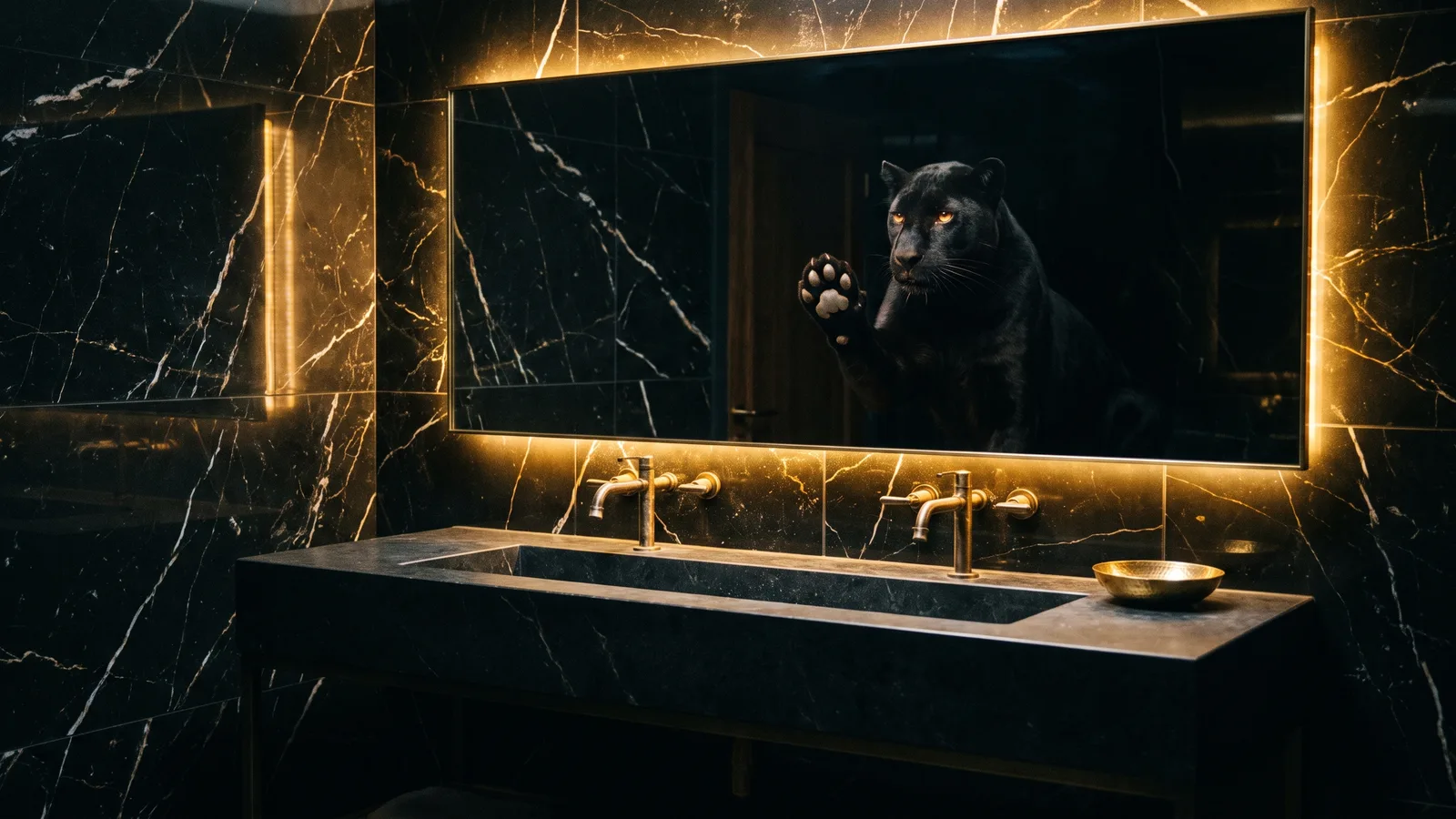
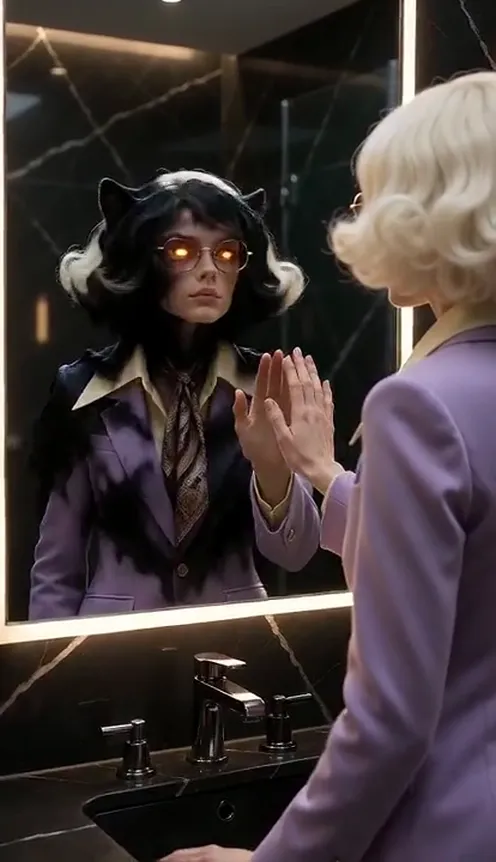
"Si tú eres la que resuelve, ¿a qué le tienes miedo?" — "If you're the one who gets things done, what are you afraid of?" That line is the caption of the mirror panther trend: a woman in a dark, gold-lit black-marble bathroom, seen from behind with her hand pressed to the mirror, while a huge black panther presses its paw against her palm from the other side of the glass. It started as a still photo template. This guide covers where it comes from, why it hit so hard, what happens in the video version, and how to make yours from one photo with the AI Mirror Panther template on Viberot — where your own reflection turns into the panther.
¿Prefieres español? Haz tu video en español
Where the mirror panther trend comes from#
The image. The trend is built around one picture: a dark bathroom with black marble walls and warm gold light around a large mirror. A woman stands with her back to the camera, one hand flat on the glass. Inside the mirror, where her reflection should be, a black panther presses its paw against her palm and looks straight back at her.
The caption. It is a Spanish-language trend. The line "Si tú eres la que resuelve, ¿a qué le tienes miedo?" is about the woman who always handles everything — so what could possibly scare her? The panther is the answer: the strength she carries inside.
The template. It started as a CapCut photo template on 18 October 2026 and jumped from a few dozen uses to over twelve thousand in about a day. TikTok tutorials showing how to make it passed a couple of hundred thousand plays each, and it spread fast among women across Latin America and beyond.
Why it went viral#
- It's a fuerza trend. The panther isn't a threat; it's you. Posting it says "I've got this" without having to say it.
- The caption hits home. Everyone knows "la que resuelve" — the one who pays the bills, fixes the problem and still shows up. It's a compliment you give yourself, or tag a friend with.
- The look is gorgeous. Black marble, gold light and a glossy panther make a moody, luxurious image that stops the scroll.
- One image, instantly readable. Hand against paw through the glass. No explanation needed, in any language.
- It's easy to join. One photo and a template. That's also why the next step — making it move — is what people are looking for now.
The video, beat by beat#
Most versions of the trend are still a single photo. The AI Mirror Panther template turns it into a 5-second video in one continuous shot, with no cut:
- The bathroom. A slow push-in from behind your shoulder: black marble walls, a dark stone vanity, brass fixtures and warm gold light glowing around a large mirror.
- Your hand to the glass. You raise your hand to the mirror, and your reflection raises its hand too — at first it's just you.
- The eyes. Your reflection's eyes flash amber-gold.
- The transformation. The reflection melts like black ink into glossy fur and becomes a huge black panther in exactly the same spot.
- Paw against palm. The panther presses its paw flat against the glass, right against your hand, golden eyes locked on yours.
- The hold. You stay calm and confident, the panther holds your gaze, and the shot rests on that image to the last frame.
Tip
The panther is calm and loyal the whole time — it never snarls, roars or attacks. It's your strength, not a scare.
How to make the mirror panther video with AI, step by step#
- Open the template. Go to the AI Mirror Panther page and sign in.
- Upload 1 photo. A clear photo of you where your face, hair and outfit are easy to see. No prompt to write.
- Pick a format. Vertical 9:16 (the default) for TikTok, Reels and Shorts, or 16:9 for YouTube. Same price either way.
- Pick a quality. Standard 720p is the default; 480p is cheaper for a first try. The exact credit cost is shown next to the Generate button before you start.
- Generate. It usually takes a few minutes.
- Add the sound and post. You get a silent 5-second MP4. Add the trend sound in TikTok or Instagram and the caption — "Si tú eres la que resuelve…" is the classic.
Choosing the right photo#
The camera starts behind your shoulder and your reflection is on screen until it transforms, so the AI needs to see your face, hair and outfit clearly.
| Works well | Causes trouble |
|---|---|
| One person, face visible and well lit | Group photos, or a face that's tiny in the frame |
| Half-body or full-body, outfit visible | Tight face crops where your clothes are cut off |
| A photo at a mirror or vanity | Heavy beauty filters that blur your features |
| Sharp focus, even light | Sunglasses, masks, a hand over the face |
| An outfit that feels like "you on a good day" | Anything you'd rather not post |
- A mirror selfie fits best, but isn't required. Any clear photo works — the AI builds the marble bathroom around you.
- Dress for the mood. Dark, elegant or gold tones look great against the black marble, but your own style is the point. You keep your face, hair, clothes and accessories.
- Pets work too. Your cat or dog keeps its own fur and markings, raises a paw to the mirror, and its reflection turns into the black panther the same way. Use a photo where the pet's face is clear.
Note
Photos that appear to show celebrities or other public figures are rejected before any credits are charged, and explicit images are always blocked. Only photos are accepted — you can't upload your own video. Use photos of yourself, your pets, or people who agreed to be in your video.
Adding the sound#
Your video comes out silent, with no music. The examples on the template page play the trend sound only as a preview. When you post on TikTok, Instagram Reels or YouTube Shorts, add the trend sound from the app's music library, so it plays under the platform's licence and your post can show up on the sound's page. Line it up so the transformation lands on a strong beat.
Audio in a downloaded file is never a music licence, so always follow the music rules of the platform where you post.
Ideas for your post#
- The classic caption. "Si tú eres la que resuelve, ¿a qué le tienes miedo?" Nothing else needed.
- Tag "la que resuelve". Make one for your mum, your sister or your best friend — with her permission — and tag her.
- The English version. "If you're the one who gets things done, what are you afraid of?" works just as well for an English-speaking audience.
- Photo vs. video. Post the still CapCut version first, then the moment it comes to life.
- New chapter. New job, new city, end of a hard year: the panther is the perfect "I made it" post.
- The cat version. Your house cat's reflection turning into a black panther is the one people will share with a laugh.
- Both formats. 9:16 for TikTok, Reels and Shorts; 16:9 for YouTube or a story highlight.
AI Mirror Panther vs. the CapCut template#
The viral CapCut template gives you a still image: your photo composited into the marble bathroom with a panther in the mirror. It's beautiful, but it doesn't move — and it's the same frame thousands of people have already posted.
The AI Mirror Panther template gives you the moment itself: the reflection that raises its hand with you, the golden eyes, the ink-to-fur transformation and the paw meeting your palm, in one continuous 5-second shot. Your face, hair and outfit come from your photo, nobody else appears in the video, and it runs in your phone's browser with no app or template link to hunt for.
Viberot is an independent tool. It is not affiliated with, endorsed by or sponsored by CapCut, the creator of the original template, or the artists and labels behind the trend sound.
How much it costs#
A Standard 720p video costs 69 credits; 480p costs 32, and Pro 1080p costs 852. The format (9:16 or 16:9) does not change the price, and the exact price is always shown next to the Generate button before you start. Credit packs are one-time payments — no subscription — start at $9.90 for 600 credits and never expire. If a generation fails, the credits go straight back to your balance. See the pricing page for details.
Frequently asked questions#
What is the mirror panther trend?#
It's a Spanish-language empowerment trend built around one image: a woman seen from behind in a dark, gold-lit black-marble bathroom, her hand pressed to the mirror, and inside the mirror a black panther pressing its paw against her palm. The caption is "Si tú eres la que resuelve, ¿a qué le tienes miedo?"
What does "Si tú eres la que resuelve" mean?#
"If you're the one who gets things done, what are you afraid of?" It celebrates the woman who handles everything. The panther stands for the strength she carries inside.
Is it a photo or a video?#
The trend started as a CapCut photo template, so most people post a still image. Viberot turns it into a 5-second video where your reflection transforms into the panther.
How many photos do I need?#
- One clear photo of one person, face visible and well lit.
Is the panther scary?#
No. It's calm and loyal: it never snarls, roars or attacks. It simply meets your hand through the glass.
Can I use my pet?#
Yes. Your cat or dog keeps its own fur and markings, raises a paw to the mirror, and its reflection becomes the black panther.
Does the video include the trend sound?#
No. The video is silent. Add the sound from the TikTok, Instagram or YouTube Shorts music library when you post.
How long is the video, and which formats are supported?#
5 seconds, in vertical 9:16 or horizontal 16:9, at the same price.
What if the generation fails?#
The credits are refunded to your balance automatically.
More one-photo trends#
If you like a moody transformation, try the ghost prank filter or the runway walk video.
If you're the one who gets things done, what are you afraid of?
One photo, one mirror, one black panther that has your back. Make your mirror panther video and post it with the trend sound.
From 32 credits · failed videos refunded · 구독 필요 없음