How to Do Venom Makeup With AI (Half Face Black Goo From One Photo)
How to do half face venom makeup with AI: where the black goo reveal came from, what happens each second, and how one photo makes the whole Halloween clip.
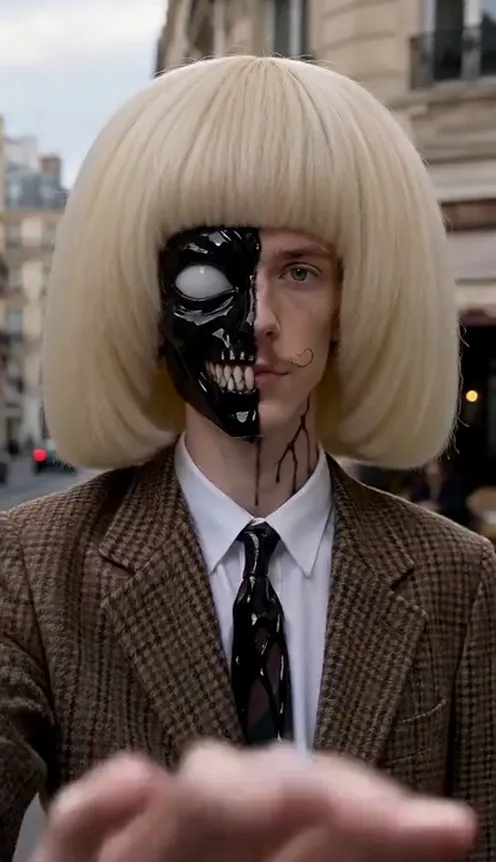
Half face venom makeup is everywhere on TikTok this Halloween. Someone looks into the camera as their normal self, sweeps a hand across the lens, and when the hand moves away one side of their face is wet, glossy black goo with a big white jagged eye and a row of fangs painted along the jaw, while the other side is still completely them. This guide explains where the look comes from, why it spreads, and how to make a 8-second version of yourself from 1 photo with the Venom Makeup AI template on Viberot, no liquid latex required.
Where the venom makeup trend comes from#
The wave started at the end of July 2026, when a UK makeup creator posted a 12-second video: she draws a jagged outline on half of her face with eyeliner while lip-syncing, lifts a hand across the camera, and reappears with that half covered in shiny black goo, a white eye and a long row of teeth. The clip passed four million views, her original sound got picked up, and by September copies with ten million views were coming from Russia, Indonesia and beyond.
In October it turned into a Halloween look. By late October there were well over ten thousand videos under the venom makeup tag, and searches for "venom makeup" and "venom face paint" climbed with it.
Why it went viral#
- Half a face is scarier than a mask. Because one side is still clearly you, the black side looks like it is taking over, not like a costume you put on.
- The swipe is instant payoff. The change happens in under a second, and people rewatch to catch it.
- It is creepy without gore. Black goo, a white eye and painted fangs. No blood, no wounds.
- The real makeup is hard. Clean jagged edges, glossy black and even fangs take liquid latex, patience and a steady hand. That makes the finished clip impressive.
- Halloween timing. It is a costume you can post the week before Halloween without buying anything.
The shot, second by second#
Here is what the 8-second version you get looks like:
- 0–2s: You. A medium close-up of you in the setting of your photo, calm, looking into the camera, in the clothes you wore in the photo.
- 2–3s: The swipe. You sweep one open hand across the lens and the frame goes dark for a moment.
- 3–5s: The reveal. One half of your face, forehead to chin, is now thick glossy black goo, with a large white jagged eye shape and long white fangs painted along the jaw. Thin black strands run down your neck. The other half is your own face, untouched.
- 5–8s: The grin. You tilt your head, a sly grin spreads, and the wet goo catches the light as the camera pushes in on your half-and-half face.
The clip comes with sound effects already mixed in: a whoosh on the swipe, a wet goo sound on the reveal and a low bass rumble. There is no song.
Step by step: how to do venom makeup with AI#
- Open the template. Go to the Venom Makeup AI page and sign in.
- Upload one photo. A clear photo of one person, facing the camera.
- Pick the aspect ratio. 9:16 for TikTok, Reels and Shorts, or 16:9 for YouTube.
- Pick a quality. Standard 480p or 720p is enough for social. Higher tiers give more detail and cost more.
- Generate. No prompt to write: the swipe, the half-face makeup, the lighting and the sound are already set. Rendering usually takes a few minutes.
- Download and post. You get a 8-second MP4 ready to upload.
Picking a photo that works#
| Works well | Causes trouble |
|---|---|
| One person, face clearly visible | Group photos where the face is tiny |
| Front-facing, looking at the camera | Sunglasses, masks, faces turned away |
| Head and shoulders, even light | Heavy filters, very dark or blurry photos |
| A neutral or calm expression | Hands or hair covering half the face |
- Your face stays. Only one half gets the goo. Your other eye, your nose, mouth, jaw and hair come from your photo, so people still recognise you.
- Your clothes and background stay. The clip uses what you wore and where you were in the photo, just a little darker and moodier.
- A calm photo is creepier. A neutral face makes the slow grin at the end land harder than a big smile.
Note
Photos that appear to show public figures or celebrities are rejected before any credits are charged. Use photos of yourself or people who agreed to be in your video.
Ideas for your post#
- Before-and-after caption. "Me vs. me after midnight" or "it only took half of me".
- Duet the makeup tutorials. Post it next to a real venom makeup tutorial: "an hour of liquid latex vs. one photo".
- Halloween countdown. Drop it in the week before Halloween with a "costume sorted" caption.
- Prank a friend. Make one of a friend (with their permission) and send it with "what happened to your face??".
- Stack the transformations. Pair it with the AI button eyes transformation or the AI vampire transformation for a Halloween series.
- Hashtags. #venommakeup, #halfacemakeup, #halloweenmakeup and #halloween put your clip where people are already watching.
AI venom makeup vs. CapCut templates and real makeup#
Most one-tap CapCut venom templates cover your whole face with a black mask in a dark room, so the result no longer looks like you. Real makeup gives you the true half-face look but takes liquid latex, black paint and an hour in front of the mirror.
The Venom Makeup AI template makes a new clip from your photo:
- No app to install. It runs in the browser on your phone or computer.
- Half a face, not a mask. Only one side changes, so the reveal reads as you being taken over.
- A real reveal. The hand swipe and the makeup change are generated as one continuous shot, with no cut to hide.
- Two aspect ratios. 9:16 vertical or 16:9 widescreen.
- Sound included. Whoosh, goo and bass effects, no song.
How much it costs#
A Standard 720p venom makeup video costs 110 credits; 480p costs 51. Higher tiers cost more, and the exact price is always shown next to the Generate button before you start. Credit packs are one-time payments, not a subscription. They start at $9.90 for 600 credits and never expire. If a generation fails, the credits go straight back to your balance. See the pricing page for details.
Frequently asked questions#
What is venom makeup?#
A Halloween face paint look where one half of the face is covered in glossy black goo with a white jagged eye and painted fangs, while the other half stays normal. On TikTok it is usually shown with a hand-swipe reveal. The AI version makes the whole 8-second clip from one photo.
Is this an official movie or comic filter?#
No. Viberot is an independent tool and is not affiliated with any film studio, comic publisher or character owner. "Venom makeup" is just what people call this black goo Halloween face paint style; the template makes a generic half-face makeup look, not any character, logo, costume or footage.
How much does it cost?#
51 credits at 480p and 110 credits at Standard 720p. The price is shown before you generate.
How many photos do I need?#
- One clear photo of one person.
Does it keep my face?#
Yes. Only one half of your face gets the goo; the other half, your hair and your clothes stay the same in every frame.
Can I use my pet?#
Not yet. The template is made for one person.
Does it have music?#
No song, only sound effects generated for the clip: a whoosh, a wet goo sound and a low bass rumble. Add any track from your platform's library when you post, and follow your platform's rules on labelling AI-generated content.
Which photos are rejected?#
Photos that appear to show public figures or celebrities are blocked before any credits are charged, and explicit images are always blocked.
Are there other spooky templates like this?#
Yes. Try the AI ghost prank filter or the AI zombie trend for more Halloween videos made from your photo.
Let the goo take half
Upload one photo and get your 8-second half face venom makeup video, goo sound effects included.
From 51 credits · failed videos refunded · 구독 필요 없음