How to Do the Bicep Heart Trend With AI (From One Photo)
How to do the bicep heart trend with AI: flex one arm, lay the other hand on top and form a heart, all from one photo in your own clothes. Silent, no watermark.
The bicep heart trend is a short, cute-and-strong clip: flex one arm, lay your other hand on top and the two arms make a heart. This guide covers what it is, why people love it, and how to make a 6-second version starring you from 1 photo with the AI Bicep Heart Trend template on Viberot.
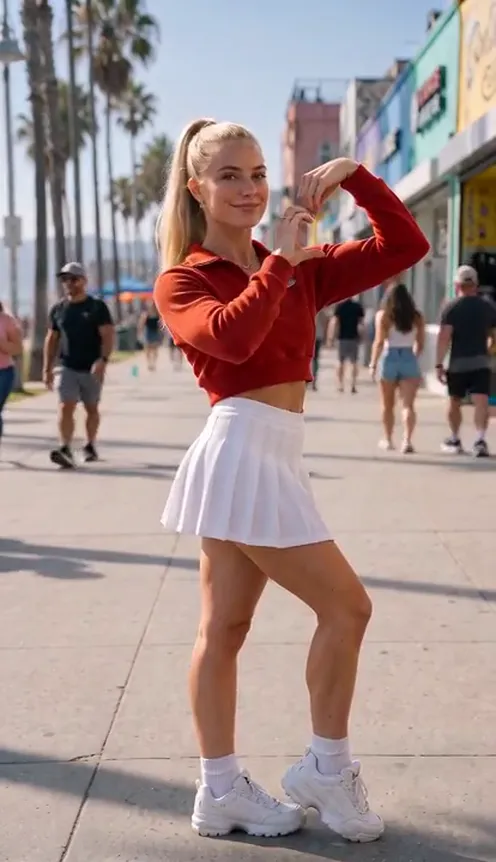
Where the bicep heart trend comes from#
The clip circulates on TikTok and Reels as a simple selfie shot: one person, waist-up, a fixed phone camera. They flex a bicep, lay the other hand on top and show off the heart, often with a wink or a small kiss.
It needs no setup, no props and no music, which is why it spreads so easily.
Why it went viral#
- It is strong and sweet at once, which is a rare combination.
- It is over in seconds, perfect for a loop.
- The heart shape is instantly readable even on a tiny screen.
- Anyone can do it, whatever their fitness level.
The clip, second by second#
Here is what the 6-second version you get looks like. It is one continuous fixed shot, like the original:
- 0–1s: The cool look. You look into the camera with a cheeky expression, one hand at your waist.
- 1–2s: The flex. You lift one arm and flex, elbow bent and fist beside your head.
- 2–4s: The heart. Your other hand lands on the flexed arm and the two arms form a heart.
- 4–6s: The hold. You hold the pose with a playful look to the camera.
Step by step: how to make it with AI#
- Open the template. Go to the AI Bicep Heart Trend page and sign in.
- Upload one photo. Use a photo where your face and both arms are visible, waist-up or full body. You appear in the outfit from your photo and the background of your photo stays as the setting.
- Pick the aspect ratio. 9:16 for TikTok, Reels and Shorts, or 16:9 for YouTube.
- Pick a quality. Standard 480p or 720p is enough for social. Higher tiers give more detail and cost more.
- Generate. No prompt to write: the moves and timing are already set. Rendering usually takes a few minutes.
- Add a sound and post. You get a silent 6-second MP4. Add the sound you want in TikTok or CapCut and post it.
Note
Photos that appear to show public figures, including actors, singers and influencers, are rejected before any credits are charged. Use photos of yourself or of friends who agreed to be in your video.
Ideas for your post#
- The couple post. Make one for you and one for your partner (with their permission) and post them side by side.
- The gym caption. "Strong and soft" over the clip.
- The workout reveal. Post it as the last clip of a gym or workout montage.
- Hashtags. #bicepheart, #flexheart and #capcuttemplate put your clip where people are already watching.
- More trends. Follow it with the AI Angry Dance Filter for a change of mood.
AI Bicep Heart Trend vs. the CapCut template#
Filming the real thing means getting the arm angle and the heart shape right on camera. With the AI Bicep Heart Trend template you upload one photo in the browser and get the finished clip, with your face, outfit and background intact.
- No filming, no rehearsing. One photo in, a finished clip out.
- No app to install. It runs on your phone or computer.
- Still you. Your face and outfit stay the same in every frame.
- Two aspect ratios. 9:16 vertical or 16:9 widescreen.
- No watermark. The file is clean and silent, ready for a sound from the platform library.
How much it costs#
A Standard 720p AI Bicep Heart Trend video costs 301 credits; 480p costs 137. Higher tiers cost more, and the exact price is always shown next to the Generate button before you start. Credit packs are one-time payments, not a subscription. They start at $9.90 for 600 credits and never expire. If a generation fails, the credits go straight back to your balance. See the pricing page for details.
Frequently asked questions#
How much does it cost?#
137 credits at 480p and 301 credits at Standard 720p. The price is shown before you generate.
How many photos do I need?#
- One clear photo of one person.
Will I keep my clothes and background?#
Yes. You appear in the outfit from your photo, and the background of your photo stays as the setting.
Does it include the original sound or song?#
No. The video is silent, with no song and no AI audio. The sound in the example on the page is a preview only. Add a sound in TikTok or CapCut when you post, so it plays under the platform licence. Audio in a downloaded file is never a music licence.
Can I make it with a celebrity photo?#
No. Photos that appear to show public figures are blocked before any credits are charged, and explicit images are always blocked.
Flex a heart
Upload one photo and get your 6-second AI bicep heart video, ready to post.
From 49 credits · failed videos refunded · 구독 필요 없음