How to Make an AI Paws At You Video (Your Pet Pats the Camera)
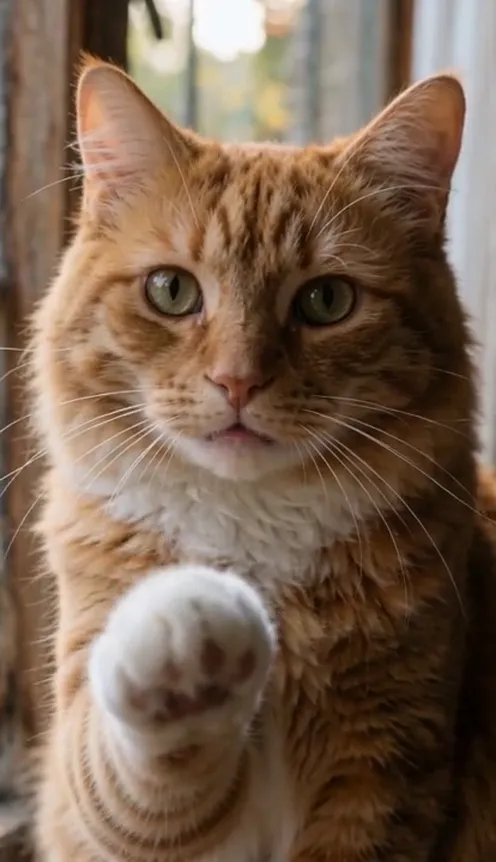
Paws at you AI guide: your cat or dog sits facing the lens and pats the camera again and again, like the Mei Mei snow leopard meme. Make it from one photo.
In late October a photo of a snow leopard with a cat-like face and enormous eyes, nicknamed Mei Mei, started going around X and TikTok with one caption: "paws at you". Within days creators were turning it into short clips where the animal pats the camera. This guide covers where the meme came from and how to make your own 8-second version from 1 photo with the AI Paws At You template on Viberot.
Where the meme comes from#
The base image is a zoo photo of a snow leopard. In late October it was edited so the face looked like a cat, with huge round eyes and one paw raised, and posted with the words "paws at you". The still image reached more than a million views on X, and the video versions followed on TikTok, some of them with several million plays. There is no single official clip: the meme is the pose and the caption, and everyone makes their own.
Why it went viral#
- The pose is instantly readable: a big animal looks at you and lifts a paw.
- The huge innocent eyes make it feel like the animal is asking for attention.
- It is easy to copy with any pet, so people reply with their own cat or dog.
What happens second by second#
- 0 to 1 second: your pet sits upright in front of a locked camera, face and chest filling the frame, eyes on the lens.
- 1 to 7 seconds: one front paw lifts, reaches toward the lens, the pad touches the camera and drops back. The pat repeats about five times with an innocent look.
- 7 to 8 seconds: the last pat settles and your pet holds the gaze.
The camera never moves, and the clip carries the original meme sound.
How to make it#
- Pick a clear photo of one cat or dog facing the camera.
- Open AI Paws At You and upload it.
- Choose 9:16 or 16:9 and a quality tier. Standard 720p costs 401 credits and 480p costs 182.
- Generate, download the MP4 and post it with the caption "paws at you".
Choosing the photo#
Use one animal per photo, face-on, with both eyes visible and good light. Keep the whole head and chest in frame. Dark or fluffy pets work fine, but avoid photos where the face is hidden, the pet is turned away or other animals and people share the picture. Your pet keeps its own fur and eyes, so a photo that shows them clearly gives the most recognisable result.
Ideas for your own post#
Caption it "paws at you", add the words "your cat when you stop scrolling", or post a side-by-side with the photo you started from. You can also make one for each pet in the house and post them as a series, or send the clip straight to a friend who needs a pat. If you want a second clip from the same photo, try Singing Pet AI or AI Pet Subway.
How it differs from CapCut templates#
A CapCut template drops your photo into a fixed edit. Here the AI generates a new clip around your own pet, so the paw, the fur and the pat timing belong to your animal rather than a stock image. See pricing for credit packs; they are one-time payments starting at $9.90 for 600 credits.
FAQ#
Will my pet turn into a snow leopard? No. It keeps its own fur colour, markings and eyes.
Which pets work? Cats and dogs work best; other pets with front paws can work too.
Does it include sound? Yes, the original meme sound from a creator. Viberot is an independent tool, not affiliated with the original creator or any artist or label, and audio in the file is not a music licence. Check the platform's rules before you post.
Are photos checked? Yes. Public figures and unsafe content are rejected before credits are spent.
Ready for your pet to paw at the camera?
Upload one photo and get a 8-second paws at you video in a couple of minutes.
From 65 credits · failed videos refunded · 구독 필요 없음