How to Do the Welcome 2027 Trend With AI (Climb the Giant 2027 From One Photo)
How to do the Welcome 2027 trend: pull yourself onto giant stone 2027 digits above a sea of clouds, what happens in the shot, and how one photo makes it.
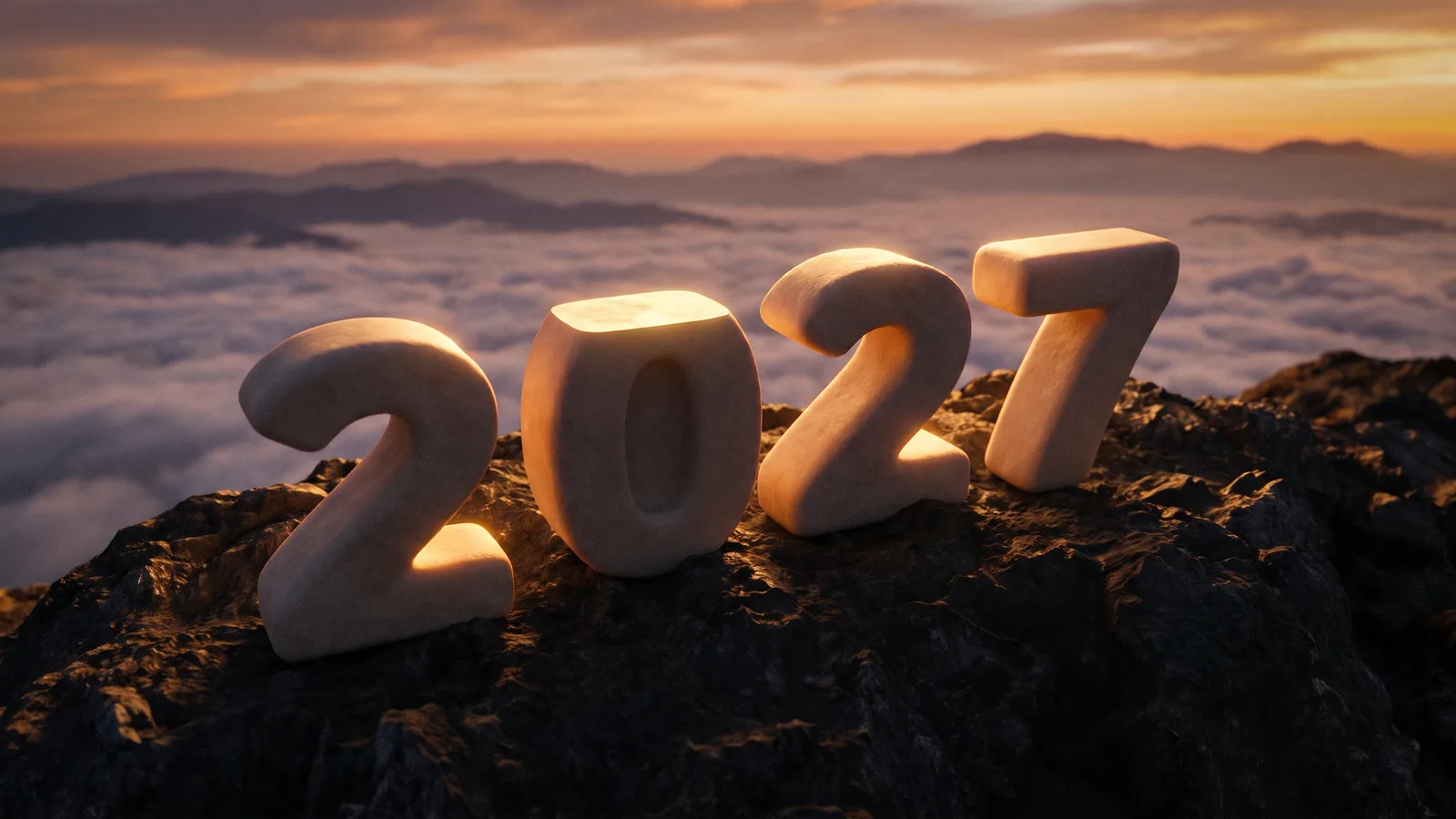
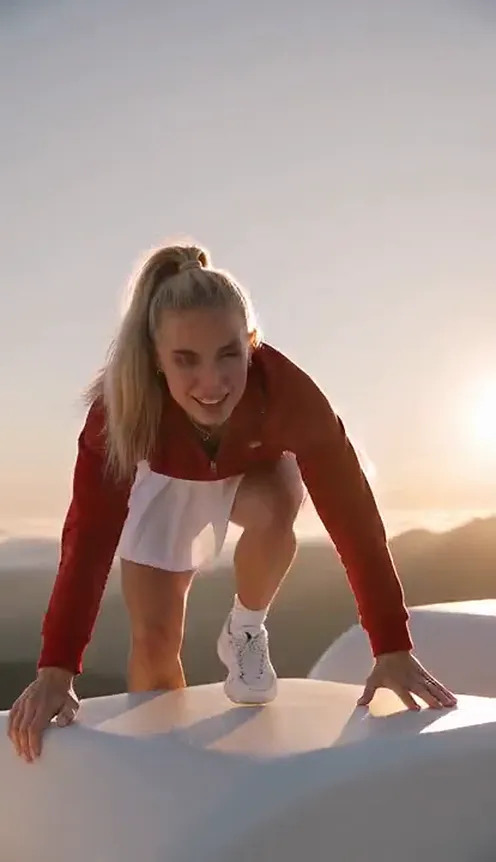
One clip is taking over TikTok ahead of New Year's Eve. It opens close on someone gripping the edge of a giant stone block and hauling themselves up, they crouch, stand and throw their arms wide, and the camera sweeps back like a drone until you see where they are: on top of four huge rounded stone digits spelling 2027, standing on a dark rocky peak above a sea of clouds, lit gold from behind. It is everywhere under #welcome2027 and #hello2027. This guide covers where the trend comes from, why it works, and how to make a 6-second version of yourself from 1 photo with the Welcome 2027 AI template on Viberot.
Where the Welcome 2027 trend comes from#
The format started as an in-app CapCut template in late October, listed as a "New 2027 AI trend". Within a week it had been used well over a hundred thousand times. The biggest wave came from French-speaking creators: a single "Adieu 2026, Bienvenue 2027" tutorial passed two million views in its first ten days, and copies followed in English, Spanish and Portuguese. Posts collect under #welcome2027, #hello2027 and #happynewyear2027, and like last year's version, it is heading for a peak in the days around New Year's Eve.
Why it went viral#
- It starts on a face. The first second is a close-up of a real person straining to pull themselves up. That is why it feels personal rather than like a stock New Year card.
- The reveal does the work. One continuous camera move turns a close-up into a drone shot of the whole 2027. No caption needed.
- The digits look touchable. Chunky, rounded, matte warm-white stone, thick enough to stand on. It reads as a real place, not a title graphic.
- Anyone can be the climber. The template needs one photo, so the whole group chat can take the same summit.
- It works in any language. "Bienvenue 2027", "bienvenido 2027", "welcome 2027": the image is the message.
The shot, second by second#
Here is what the 6-second version you get looks like. It is a single camera move with no cuts:
- The pull-up. Eye level, close on your face and hands gripping the top edge of the stone, straining to haul yourself up.
- Onto the 0. You crouch on the flat top of the giant 0, then rise to your feet.
- Arms wide. You turn to the camera and spread both arms wide against warm golden backlight and haze.
- The drone reveal. The camera sweeps back and up until all four digits, 2-0-2-7, stand on the dark rocky summit above the clouds, with you small on top of the 0.
The clip comes with generated sound: strong mountain wind, an effortful breath as you pull up and a rising string swell as the camera pulls back. There is no song, because there is no official trend sound: creators add their own. Add any track from your platform's music library when you post.
Step by step: how to do the Welcome 2027 trend with AI#
- Open the template. Go to the Welcome 2027 AI page and sign in.
- Upload one photo. A clear photo of one adult, face visible and not hidden by sunglasses or a hat brim. Waist-up or full body works best.
- Pick the aspect ratio. 9:16 for TikTok, Reels and Shorts, or 16:9 for YouTube.
- Pick a quality. 480p or 720p is enough for social. Higher tiers give more detail and cost more.
- Generate. No prompt to write: the summit, the digits and the camera move are already set. Rendering usually takes a few minutes.
- Download and post. You get a 6-second MP4. Add your caption and post it before the countdown.
Picking a photo that works#
| Works well | Causes trouble |
|---|---|
| One adult, face clearly visible | Group photos where the face is tiny |
| Waist-up or full body in frame | Extreme close-ups of only the face |
| Even light, sharp focus | Heavy filters, very dark or blurry photos |
| An outfit you are happy to keep | Sunglasses, hat brims, hands over the face |
- You keep your own clothes. The AI keeps the outfit from your photo, so a puffer, a suit or your party look all work.
- The background is always the summit. Your photo's background is not used; the scene is the rocky peak above the clouds with the giant 2027.
- A sharp face photo matters most. The opening close-up is where people recognise you before the camera pulls away.
- The digits are fixed. They always read 2027. AI lettering can occasionally drop a stroke, the known weak point of this trend in every tool. If that happens, generate again.
Note
Photos that appear to show public figures or celebrities are rejected before any credits are charged. Use photos of yourself or people who agreed to be in your video.
Ideas for your post#
- The classic caption. "Welcome 2027" or "hello 2027" plus your city.
- The recap caption. "2026 tried to keep me down. Still climbed. Welcome 2027."
- Before and after. Post your worst 2026 photo first, then cut to the climb.
- Family countdown. Make one for each family member and post them as a series through December.
- Any language. The biggest posts so far are in French; "bienvenue 2027" and "bienvenido 2027" post just as well.
- Hashtags. #welcome2027, #hello2027 and #happynewyear2027 are where the trend lives.
Welcome 2027 AI vs. the CapCut template#
The CapCut template is an in-app effect: you need the app and you work inside its editor. The Welcome 2027 AI template on Viberot is an independent web tool, not affiliated with CapCut or TikTok:
- Renders in the browser. No app to install; it works the same on your phone or computer.
- The full camera move. Close-up pull-up to drone reveal in one 6-second shot.
- Still you. Your face, hair and the outfit from your photo stay the same in every frame.
- Two aspect ratios. 9:16 vertical or 16:9 widescreen.
- Plain MP4. Yours to post anywhere, with whatever sound you choose from the platform library.
How much it costs#
A Standard 720p Welcome 2027 video costs 301 credits; 480p costs 137. Higher tiers cost more, and the exact price is always shown next to the Generate button before you start. Credit packs are one-time payments, not a subscription: they start at $9.90 for 600 credits and never expire. If a generation fails, the credits go straight back to your balance. See the pricing page for details.
Frequently asked questions#
What is the Welcome 2027 trend?#
A New Year trend where an AI video shows you climbing onto four giant stone digits spelling 2027 on a peak above the clouds, arms spread as the camera pulls away. It spread on TikTok under #welcome2027 ahead of New Year's Eve. The AI version makes the whole 6-second clip from one photo.
Is this affiliated with CapCut or TikTok?#
No. Viberot is an independent tool and is not affiliated with, endorsed by or connected to CapCut or TikTok. The digits are a plain "2027" with no logos.
How much does it cost?#
137 credits at 480p and 301 credits at Standard 720p. The price is shown before you generate.
How many photos do I need?#
- One clear photo of one adult, face visible.
Why do I look small at the end?#
The camera pulls far back to show the whole 2027; that is the shot. The close-up at the start keeps you recognisable.
Can I use my pet or a photo of two people?#
Not on this template. It is built for exactly one climber, so use a photo of one person.
Does it include a song?#
No. The audio is generated: mountain wind, a breath and a string swell, with no vocals. There is no official trend sound; add your own from the platform's music library when you post, and follow that platform's rules on labelling AI-generated content.
Which photos are rejected?#
Photos that appear to show public figures or celebrities are blocked before any credits are charged, and explicit images are always blocked.
Climb into the New Year
Upload one photo and get your 6-second Welcome 2027 climb, ready to post for the countdown.
From 49 credits · failed videos refunded · sin suscripción