How to Make an On The Radar AI Video: The 679 Duo Trend
The On The Radar AI trend explained: the green neon studio, why the 679 duo went viral, and how to make your own on the radar ai video from just two photos.
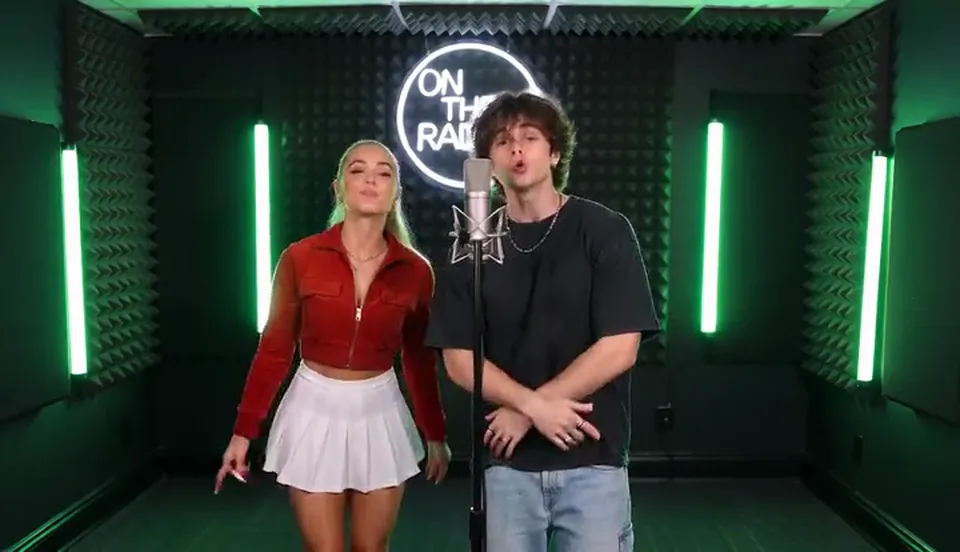
The On The Radar trend drops two people into a small radio studio soaked in green neon light. One stands at the mic and sings the chorus of "679" straight into the camera, swinging an arm and shrugging. The other stands beside them, bouncing, pointing one finger at the ceiling and hyping every line. It's a single 14-second take with no cuts, and the version filling TikTok wasn't filmed in a studio at all: it's an AI video made from two photos. This post covers where the look comes from, why it caught on, and how to make an on the radar ai video that actually looks like you and your friend.
The clip below was made with the On The Radar AI video generator on Viberot.
Where the green studio comes from#
On The Radar is a hip-hop radio and freestyle series known for its set: a compact booth lit almost entirely green, a round glowing sign on the back wall, tall neon tubes on either side and a mic on a stand up front. Rap fans recognise it instantly, the same way they recognise a single-colour backdrop from other performance series.
The trend took that set and paired it with the chorus of Fetty Wap's "679". An AI-generated clip of two people in suits performing the chorus there — one singing, one hyping — went viral at the end of August, racking up millions of views and an unusually high share rate. Within days people were remaking it with friends, partners, coworkers and cartoon characters, and tutorials titled "on the radar trend full tutorial" started showing up everywhere.
Why the 679 duo works so well#
- The setting does the work. Green light, round sign, mic. You don't need to explain the joke; anyone who has seen one version knows what they're watching.
- Two roles, zero choreography. The singer just performs to the camera. The hype partner just bounces and points. Nobody has to learn a dance.
- It's built for tagging a friend. Because it needs two people, every version is an invitation: "who's my hype man?"
- The contrast is the joke. The funniest versions put someone very unlikely at the mic — your quiet coworker, your grandmother, your gym buddy — and let them go all in on the chorus.
The shot, second by second#
The original is one locked-off, horizontal take. Roughly:
- 0–2s: the singer waves an open hand into the chorus while the partner points high above their head.
- 2–4s: the singer throws one arm wide and shrugs; the partner dips and sways.
- 4–7s: the singer leans into the mic and keeps going; the partner nods along.
- 7–9s: both push their hands toward the camera in rhythm.
- 9–14s: the singer keeps swinging an arm while the partner points to the sky again and again.
Because there are no cuts, timing and energy matter more than anything else. That's why prompt-only versions usually look wrong: the gestures are generic and the two people stand still.
How to make your On The Radar AI video#
The On The Radar AI template copies the motion from a reference performance instead of guessing it from text:
- Upload two photos. Photo one becomes the hype partner on the left, photo two the singer on the right. Each person keeps their side for the whole clip.
- Pick a format. 16:9 shows the whole studio like the original; 9:16 works for TikTok and Reels.
- Generate. The video takes a few minutes. Both of you keep your own face, hair and outfit — nobody gets swapped into a suit.
- Add the sound when you post. The video comes with AI-generated sound, not the original song. Add the official "679" sound from TikTok's or Instagram's music library and it lines up with the performance.
Choosing the right photos#
- One person per photo, face clearly visible, good light.
- Waist-up or full body works best, since the clip shows you from the thighs up.
- Think about casting. Put the most unexpected person at the mic. The hype role suits whoever is most fun to watch.
- Only use photos of yourself or people who agreed. Photos of public figures are rejected before any credits are charged.
Posting ideas#
- "Me and my best friend when the aux finally gets passed to us."
- Swap roles: make a second version with the other person singing.
- Couples version with the quieter partner on vocals.
- Office edition with your manager on the mic (with permission).
How is this different from a CapCut template?#
CapCut-style templates usually paste faces onto fixed footage, so the outfits, bodies and lighting stay the same as the original and the faces often look stuck on. Here the whole person is generated in the green studio — your face, hair and clothes, moving with the original timing — so it looks like you were actually in the booth.
Tips for a better on the radar ai video#
- Match the energy in your photos. A big smile or an open mouth in the singer's photo helps the chorus look natural; a relaxed, playful photo suits the hype role.
- Keep the outfits you want to show off. Whatever you wear in your photo is what you wear in the booth, so pick the jacket or tee you want people to see.
- Use 16:9 for the classic look. The original clip is horizontal and shows the whole studio. Pick 9:16 only if you plan to post it as a vertical-first Reel.
- Post with the sound right away. Add the official "679" sound in the app before captioning, so the chorus starts with the first frame.
Price and FAQ#
A 720p video costs 597 credits and 480p costs 271. Credit packs are one-time payments starting at $9.90 for 600 credits — see pricing. Failed generations are refunded automatically.
Does it include the song? No. The video has AI-generated sound; add the official "679" sound when you post. The examples on the page play the song for preview only.
Is this official? No. Viberot is an independent AI tool, not affiliated with On The Radar Radio, Fetty Wap or any label.
Can I do it alone? The trend is a duo, so the template needs 2 photos. Want another two-person music trend? Try the Hotel Lobby AI duo.
Ready? Make your On The Radar video with two photos.
Get on the radar
Upload two photos and get your green-neon 679 duo, ready for the official sound.
From 96 credits · failed videos refunded · 구독 필요 없음