How to Make the Damon Salvatore AI Church Scene (From One Photo)
How to make the Damon Salvatore AI church scene: walk in through the doors, cross yourself lazily and end on a slow smirk, all from one photo of yourself.
The Damon Salvatore AI trend is the coolest entrance on TikTok right now. Church doors swing open, every head in the pews turns, a guy in all black dips two fingers in the holy water, crosses himself like he could not care less and stops for a slow smirk. This guide covers where the trend comes from, why it spread, and how to make a 11-second version starring you from 1 photo with the Damon Salvatore AI template on Viberot.
Where the Damon Salvatore trend comes from#
Damon Salvatore is the sarcastic vampire from a hit supernatural TV drama, and his scenes have been edit material for years. In late September 2026 a wave of AI "Damon smirk" edits took off, and on October 14 a second wave arrived: an AI remake of his church entrance, where he strolls into a quiet service and lazily crosses himself. Within days the clip had millions of views, a CapCut template appeared, and #damonsalvatore filled up with people putting themselves in the scene.
The joke works because of the contrast: a hushed church, a room full of people in their Sunday best, and one guy in a black jacket who walks in like he owns the place.
Why it went viral#
- Pure main-character energy. You walk in, everyone turns around, and you do not even look at them.
- The tiny gestures sell it. Two fingers in the holy water, a lazy cross, a little finger twirl. It reads as cool without saying a word.
- The smirk ending. The last two seconds are a slow, knowing smile straight out of a vampire drama.
- Halloween timing. Vampire season and a vampire meme in the same month.
- Anyone can be Damon. Your boyfriend, your best friend, your dad, you.
The scene, second by second#
Here is what the 11-second version you get looks like:
- 0–1s: The doors. A wide shot from the back pews: the white church doors swing open and you step in.
- 1–3s: Heads turn. Two quick cuts to the guests in the pews, twisting round over their shoulders to see who just walked in.
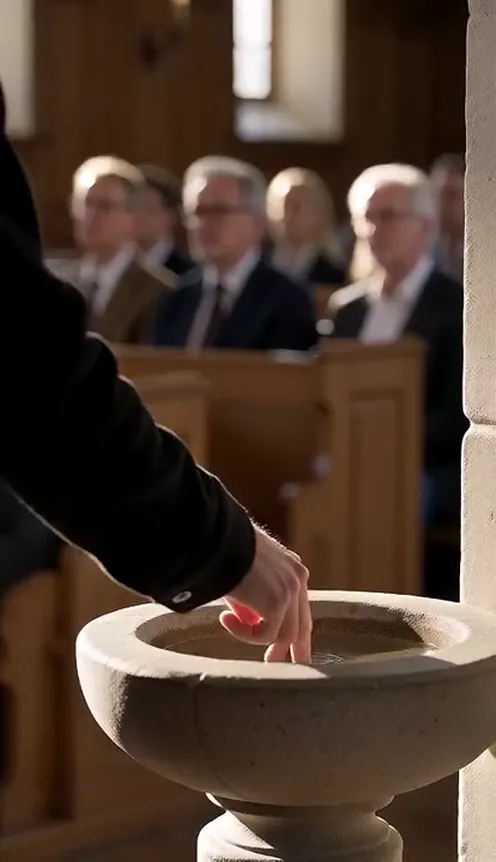
- 3–4s: Holy water. A close-up of your hand in a black sleeve dipping two fingers into the stone basin by the door.
- 4–9s: The walk. You stroll in, glance to the side, lazily cross yourself and twirl your fingers in front of your chest as you come closer.
- 9–11s: The smirk. A chest-up close-up: you stop, look around the room and let a slow smirk take over.
You are dressed in the look the scene is known for: a plain black jacket over a black T-shirt, no logos. Your face, hair and jewellery come from your photo. The clip comes out silent; add the trending sound from your platform's music library when you post. The example on our page plays it as a preview only.
Step by step: how to make the Damon Salvatore AI video#
- Open the template. Go to the Damon Salvatore AI page and sign in.
- Upload one photo. A clear photo of one person, face visible. Half-body or full-body works best.
- Pick the aspect ratio. 9:16 for TikTok, Reels and Shorts, or 16:9 for YouTube.
- Pick a quality. Standard 480p or 720p is enough for social. Higher tiers give more detail and cost more.
- Generate. No prompt to write: the church, the guests, the holy water and every cut are already set. Rendering usually takes a few minutes.
- Add a sound and post. You get a silent 11-second MP4. Add the trending sound from the TikTok or Instagram library and post it.
Picking a photo that works#
| Works well | Causes trouble |
|---|---|
| One person, face clearly visible | Group photos where the face is tiny |
| Half-body or full-body in frame | Extreme close-ups that crop the head |
| Even light, sharp focus | Heavy filters, very dark or blurry photos |
| A neutral or slightly serious face | Sunglasses, masks or hands covering the face |
- Your outfit changes, you do not. The all-black jacket is part of the scene, but your face, hairstyle and jewellery stay exactly as in your photo.
- Hats only if you wear one. If your photo shows a cap, you keep it; otherwise you walk in bare-headed. No logos either way.
- You are the only star. The guests in the pews are generated as ordinary churchgoers and never look like you.
Note
Photos that appear to show public figures, including actors and celebrities, are rejected before any credits are charged. Use photos of yourself or of friends who agreed to be in your video.
Ideas for your post#
- The classic. "POV: you walk into church after what you did last night" with the clip and nothing else.
- Tag the friend. Make one of your friend who always shows up late (with their permission).
- Halloween drop. Post it the week of Halloween with a vampire caption, and follow it with the full fangs-and-cape AI Vampire Transformation.
- Hashtags. #damonsalvatore, #damonsalvatoreai and #churchscene put your clip where people are already watching.
Damon Salvatore AI vs. the CapCut template#
The CapCut template is quick, but it runs inside the CapCut app and only works with its fixed version of the clip.
The Damon Salvatore AI template makes a new video from your photo in the browser:
- No app to install. It runs on your phone or computer.
- Still you. Your face, hair and jewellery stay the same in every shot.
- The real shot list. Doors, turning heads, holy water, the cross and the smirk, cut on the same beats as the viral original.
- Two aspect ratios. 9:16 vertical or 16:9 widescreen.
- No watermark. The file is clean and silent, ready for a sound from the platform library.
How much it costs#
A Standard 720p Damon Salvatore AI video costs 184 credits; 480p costs 89. Higher tiers cost more, and the exact price is always shown next to the Generate button before you start. Credit packs are one-time payments, not a subscription. They start at $9.90 for 600 credits and never expire. If a generation fails, the credits go straight back to your balance. See the pricing page for details.
Frequently asked questions#
What is the Damon Salvatore AI trend?#
A TikTok and CapCut trend where people remake the vampire character's famous church entrance: walking in, crossing themselves lazily and ending on a smirk. The AI version on Viberot makes the full 11-second scene with you in the lead, from one photo.
How much does it cost?#
89 credits at 480p and 184 credits at Standard 720p. The price is shown before you generate.
How many photos do I need?#
- One clear photo of one person.
Do I get red eyes or fangs?#
No. The template follows the original church entrance, which plays it cool with no effects. For red eyes, fangs and a cape, use AI Vampire Transformation.
Does it include the song?#
No. The video is silent, with no song and no AI audio. The music in the example on the page is a preview only. Add the trending sound from the TikTok, Instagram or YouTube Shorts library when you post, so it plays under the platform's licence. Audio in a downloaded file is never a music licence. Follow your platform's rules on labelling AI-generated content.
Is this connected to the TV show?#
No. Viberot is an independent tool and is not affiliated with, endorsed by or connected to the show, its studio, its network or any actor. The video uses no footage, likeness or logo from the show; the person on screen is you.
Can I make it with an actor or a celebrity?#
No. Photos that appear to show public figures, including actors and celebrities, are blocked before any credits are charged, and explicit images are always blocked.
Can I use my pet?#
Not yet. The template is made for one person walking into the church.
Your entrance, your smirk
Upload one photo and get your 11-second Damon Salvatore AI church scene, ready to post.
From 89 credits · failed videos refunded · 구독 필요 없음