How to Do the Toy Car to Real Car AI Trend (From One Photo)
How to do the toy car to real car AI trend: a tiny model of your car on a train window grows into the real car in a tunnel, made from one photo of your car.
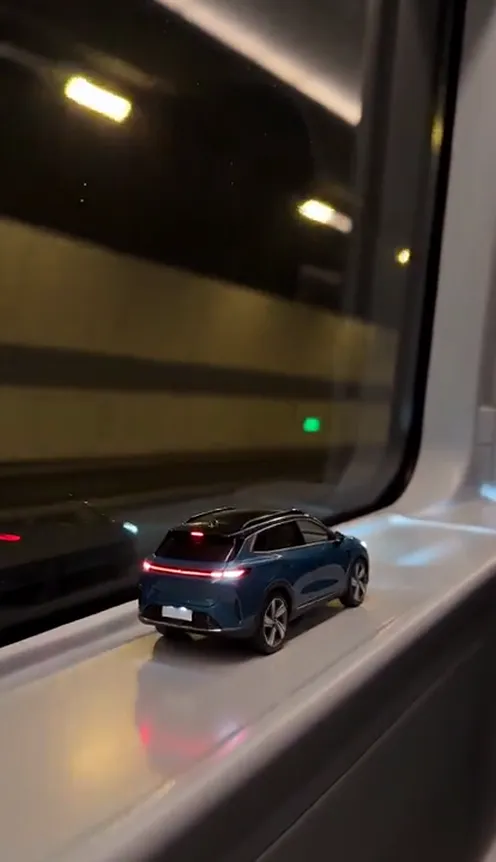
The toy car to real car trend is the car transition everyone is copying right now. A tiny model of someone's car rides on the window ledge of a train, the train dives into a tunnel, the toy's tail lights switch on, and suddenly it is the real car, full size, speeding out of the tunnel. This guide covers where the trend comes from, why it works, and how to make a 10-second version with your own car from 1 photo using the AI Toy Car to Real Car template on Viberot.
Where the toy car to real car trend comes from#
Toy-to-real car transitions have been around for a while. Earlier in 2026 the "Your Next Opponent Is You" version had people film a die-cast toy and then their real car from the same angle and cut between the two.
The version that took off in October 2026 is fully AI-made and needs no filming at all. Creators on TikTok and Instagram Reels took photos of their own cars and turned them into one continuous shot: a scale model on a train window ledge, a tunnel, and a seamless push-through where the toy becomes the real car. Tutorials for the "train window to real car" edit followed within days.
Why it went viral#
- Everyone loves their car. It is a flex that also feels like a childhood memory: the toy you had, now the car you drive.
- The transition is satisfying. One unbroken move from tiny to full size, no hard cut.
- No face needed. Car accounts, dealers and people who never show their face can all post it.
- Instant caption. "Kid me vs. adult me" or "manifested it" writes itself.
- Every car works. Hatchbacks, SUVs, pickups, sports cars: the joke is the same.
The shot, second by second#
Here is what the 10-second version you get looks like. It is one continuous shot with no cuts:
- The toy. A detailed 1:24 scale model of your car sits on a train window ledge while trees and concrete walls blur past outside.
- The tunnel. The train enters a tunnel, the window goes dark, tunnel lights streak by and the toy's tail lights and headlights flick on.
- The push-through. The camera glides through the window, the frame slides away, the ledge turns into the tunnel road and the toy grows into your real car.
- The drive. Your car speeds through the lit tunnel, filmed from low behind like a car commercial.
- The exit. It bursts out of the tunnel into the light onto an open highway.
There are no people and no hands in the shot, just your car. The clip comes out silent; add the trending sound in TikTok or CapCut when you post. The example on our page plays it as a preview only.
Step by step: how to do the toy car to real car trend with AI#
- Open the template. Go to the AI Toy Car to Real Car page and sign in.
- Upload one photo of your car. Sharp, in daylight, with the whole car in frame.
- Pick the aspect ratio. 9:16 for TikTok, Reels and Shorts, or 16:9 for YouTube.
- Pick a quality. Standard 480p or 720p is enough for social. Higher tiers give more detail and cost more.
- Generate. No prompt to write: the train, the tunnel and the transition are already set. Rendering usually takes a few minutes.
- Add a sound and post. You get a silent 10-second MP4. Add the trending sound in TikTok or CapCut and post it.
Picking a photo that works#
| Works well | Causes trouble |
|---|---|
| The whole car in frame, bumper to bumper | Close-ups of a wheel, a badge or the interior |
| Front or rear three-quarter angle | Straight top-down or very low, distorted angles |
| Daylight, sharp focus | Night shots, heavy filters, motion blur |
| Nothing in front of the car | People, other cars or poles blocking the view |
| Cars, SUVs, pickups, vans | Motorbikes and very large trucks |
- Your car stays your car. Colour, body shape, wheels and lights carry over from the toy to the real car.
- Toy photos work too. Got a die-cast model of your dream car? Upload that photo and you get the same transition with that car.
- Plates stay private. Number plates and badges are kept plain and unreadable.
Ideas for your post#
- The glow-up. "Kid me with the toy vs. me now" over the clip.
- The new-car announcement. Post it the day you pick up your car.
- The dream car. Use a photo of the car you are saving for and caption it "manifesting".
- The dealer reel. Showcase a car on the lot without filming a thing (with permission to post it).
- Hashtags. #toycartorealcar, #cartok and #cartransition put your clip where car people are already watching.
For another photo-to-video transformation, try Stones to Castle.
AI Toy Car to Real Car vs. the CapCut edit#
The classic way is to buy a toy version of your car, film it, film your real car from the same angle, and line up the cut in CapCut. The AI tutorials floating around need several apps: one to make a toy image, another to animate it, and an editor to stitch it together.
The AI Toy Car to Real Car template does it from one photo in the browser:
- No toy needed. The model of your car is made for you.
- No filming, no editing. One photo in, a finished transition out.
- No app to install. It runs on your phone or computer.
- Same car the whole way. Colour, shape, wheels and lights stay consistent from toy to real.
- Two aspect ratios. 9:16 vertical or 16:9 widescreen.
- No watermark. The file is clean and silent, ready for a sound from the platform library.
How much it costs#
A Standard 720p AI Toy Car to Real Car video costs 137 credits; 480p costs 64. Higher tiers cost more, and the exact price is always shown next to the Generate button before you start. Credit packs are one-time payments, not a subscription. They start at $9.90 for 600 credits and never expire. If a generation fails, the credits go straight back to your balance. See the pricing page for details.
Frequently asked questions#
What is the toy car to real car trend?#
A transition trend from October 2026 where a tiny model of a car on a train window ledge turns into the real car in a tunnel. The AI version on Viberot makes the full 10-second shot from one photo of your car.
How much does it cost?#
64 credits at 480p and 137 credits at Standard 720p. The price is shown before you generate.
What photo do I need?#
1 sharp daylight photo of your car with the whole car visible. A photo of a toy or scale model works too.
Do I appear in the video?#
No. The video shows only your car, with no people or hands.
Does it include music?#
No. The video is silent, with no song and no AI audio. The music in the example on the page is a preview only. Add the trending sound in TikTok or CapCut when you post, so it plays under the platform's licence. Audio in a downloaded file is never a music licence. Follow your platform's rules on labelling AI-generated content.
Will my number plate show?#
No. Number plates and badges are kept plain and unreadable.
From toy to the real thing
Upload one photo of your car and get your 10-second AI toy car to real car video, ready to post.
From 64 credits · failed videos refunded · 구독 필요 없음