How to Do the Stones to Castle AI Trend (From One Photo)
How to do the Stones to Castle AI trend: where the viral "they threw stones, I built a castle" reel comes from, every shot, and how one photo makes it.
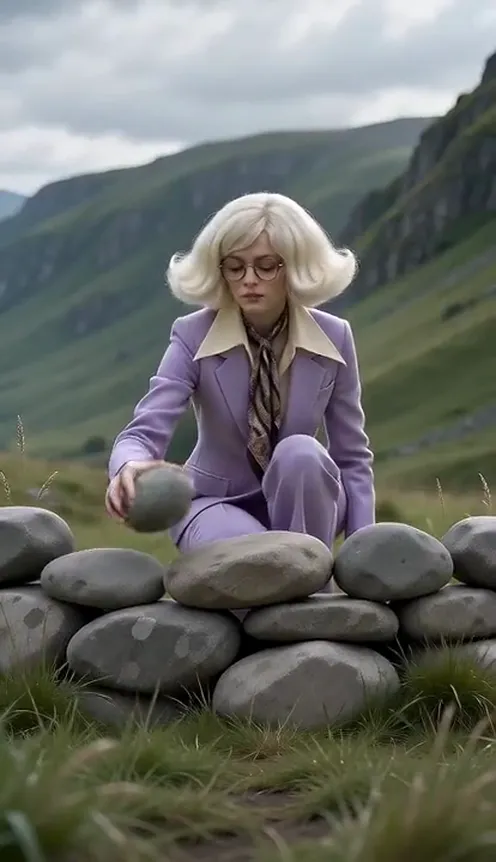
The Stones to Castle AI trend is a tiny epic film. An angry crowd in a green mountain valley throws stones at one person. That person doesn't run. They pick up a stone, a low stone wall starts growing around them, and it keeps stacking until it becomes a Gothic castle with spires in the clouds. The crowd looks up with their mouths open, and the last shot is the hero in a castle window with a small smile. This guide covers where the trend comes from, why it spread so fast, and how to make a 15-second version starring you from 1 photo with the Stones to Castle AI generator on Viberot.
Where the Stones to Castle trend comes from#
The trend started with an AI-made short film posted as an Instagram reel around October 21, 2026. It passed 1.9 million likes in about a day, and remakes started showing up on TikTok within hours, one of them crossing a million views in under a day.
The story is a visual version of an old saying: "they threw stones at me, so I built a castle." Every version keeps the same beats: the crowd, the calm hero, the single stone, the wall that grows into a castle, the stunned crowd and the window shot at the end.
Why it went viral#
- It's a comeback story in 15 seconds. Everyone has had people doubt them. Watching the stones turn into a castle is pure satisfaction.
- It looks like a movie. Mountain valley, crowd scene, a castle rising out of the ground. It feels like a trailer, not a phone clip.
- There's no dialogue. It works in any language, which is why the comments are full of Hindi, Urdu, Arabic, Turkish and Russian.
- It fits any caption. New job, breakup glow-up, business launch, graduation: the clip says "I'm doing fine" without a word.
- Anyone can be the hero. It works for you, your mom, your best friend or your business partner.
The shots, second by second#
Here is the 15-second version you get:
- 0–2s: The crowd. A wide shot of the valley. Far away, an angry crowd throws stones from behind piles of rocks.
- 2–4s: The calm. You stand alone on the grass, looking straight into the lens. A stone flies past and lands on the grass. You don't move.
- 4–5s: The shouting. A quick cut back to the blurry crowd pointing and yelling.
- 5–7.6s: The stone. A close-up of your hand picking up one stone, then you crouching and looking at it.
- 7.6–11.6s: The castle rises. A low stone wall around you grows taller and taller, turns into castle walls, and the camera tilts up as Gothic spires rise into the clouds.
- 11.6–13.3s: The reaction. A huge castle fills the valley while the tiny crowd stares up at it.
- 13.3–15s: The window. You in an arched castle window, looking into the lens with a quiet smile.
Nobody gets hit: the stones only ever land on the grass, and the crowd stays in the distance.
Step by step: how to do the Stones to Castle trend#
- Open the template. Go to the Stones to Castle AI page and sign in.
- Upload one photo. A clear photo of one person, face visible, ideally full body.
- Pick the aspect ratio. 9:16 for Reels, TikTok and Shorts, or 16:9 for YouTube.
- Pick a quality. Standard 480p or 720p is enough for social. Higher tiers give more detail and cost more.
- Generate. No prompt needed. The valley, the crowd, the castle and the window shot are already set. Rendering usually takes a few minutes.
- Download and post. You get a 15-second MP4 with no sound. Add the trending audio from the Instagram or TikTok sound library when you post.
Picking a photo that works#
| Works well | Causes trouble |
|---|---|
| One person, face clearly visible | Group photos where the face is tiny |
| Full body or waist up, standing | Only a face crop, or a hand |
| Even light, sharp focus | Heavy filters, very dark or blurry photos |
| A calm or confident expression | Sunglasses, masks, faces turned away |
- Your outfit stays. You wear the clothes from your photo in every shot, including the window. The original hero wore a bold red suit, so a red outfit gives you the classic look; a sharp suit or a dress you love works just as well.
- Confidence sells it. A calm, steady look into the camera makes the final window shot land.
Note
Photos that appear to show public figures or celebrities are rejected before any credits are charged. Use photos of yourself or people who agreed to be in your video.
Ideas for your post#
- The glow-up. Caption it "they laughed when I started" and post it on the day you share good news.
- The business launch. Small business owners use it for a launch or a milestone: "every no became a stone in the wall".
- The graduation. Post it with your results: "they said I wouldn't finish".
- Make one for someone else. Your mom, a friend who just got through a hard year, a teammate after a big win (with their permission).
- Short captions win. "They threw stones. I built a castle." says everything.
Stones to Castle AI vs. CapCut templates#
A CapCut-style template pastes your face or clip into someone else's footage, so the body, the outfit and the scenes belong to the original. With Stones to Castle AI the whole film is generated around your photo: you actually stand in the valley, pick up the stone and appear in the castle window, in your own clothes. You don't need an app or a template link, just a browser.
Price and FAQ#
How much does it cost? A Standard 720p video costs 251 credits and 480p costs 121. Credit packs are one-time payments, start at $9.90 for 600 credits and never expire. Failed videos are refunded automatically.
How many photos do I need? Just 1.
Does it come with the song? No. The video has no sound, so you can pick the trending audio in Instagram or TikTok when you post. Viberot is an independent tool, not affiliated with the creator of the original reel or any artist or label.
Can I use my pet? This one is made for people, since the story needs someone who picks up a stone and smiles from a window.
Is it violent? No. Stones only land on the grass, nobody is hit and there is no blood.
Ready to build yours? Open Stones to Castle AI, upload a photo and let them throw stones.
Let them throw stones
Upload one photo, pick up the stone, and watch your castle rise over the valley.
From 121 credits · failed videos refunded · sin suscripción