How to Do the No Guidance Dance AI Trend (Train Version, One Photo)
How to do the No Guidance dance AI trend: where the viral train-aisle version comes from, every move second by second, and how to make yours from one photo.
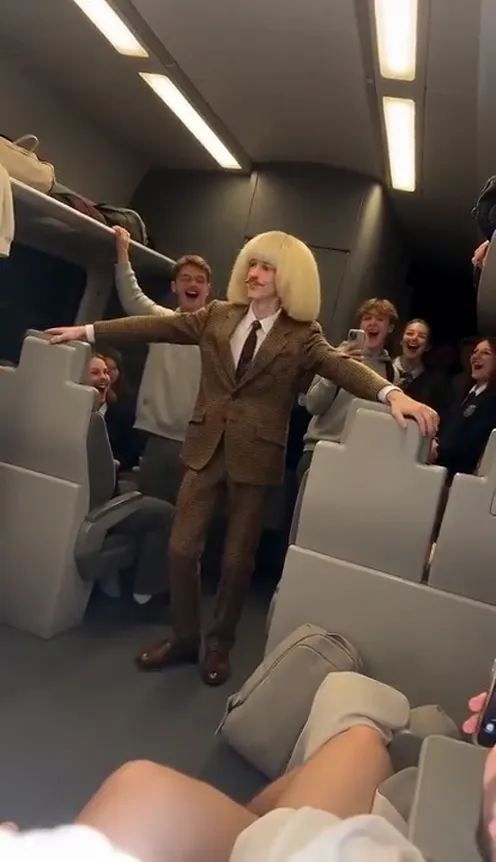
The No Guidance dance trend is back, and the newest version happens on a train. One passenger stands up in the middle of a packed night-time carriage, spreads both arms out like airplane wings, sways down the aisle toward the camera, then finishes with both hands on the back of the head, knees bent and hips rolling. Everyone around them laughs and films. This guide covers where the trend comes from, why the train version took off, and how to make a 9-second version starring you from 1 photo with the No Guidance Dance AI generator on Viberot.
Where the No Guidance dance comes from#
The dance comes from the ending of the music video for the 2019 song "No Guidance". In 2020 a remix of the song kicked off a TikTok dance challenge, and the moves stuck around: arms out wide, a loose shoulder sway, then hands on the head and a slow hip roll.
In 2026 the dance came back. A street-corner duo version passed two million views in March, a version filmed from a moving train went viral in early October, and from mid-October AI templates started putting anyone into a crowded train aisle doing the same routine. That train-aisle version is the one you see everywhere right now.
Why the train version went viral#
- The setting is the joke. A full carriage of strangers, everyone on their way home, and one person who decides to perform. You can feel the second-hand embarrassment and the joy at the same time.
- The crowd reacts for you. The passengers laughing and holding up their phones tell the viewer this is funny before the dance even starts.
- The moves are easy to recognise. Airplane arms and hands-on-head are readable in a thumbnail, even with the sound off.
- It is best with an unlikely dancer. The most shared versions star someone's dad or grandpa, a teacher or a coworker in a suit.
The moves, second by second#
Here is the 9-second version you get:
- 0–2.5s: Airplane arms. You stand in the aisle a few metres from the camera, both arms stretched out wide, swaying side to side and shuffling toward the lens.
- 2.5–5s: The sway. Arms still wide, rocking your shoulders to the beat while passengers on both sides laugh and film.
- 5–7s: The groove. A small turn to the side, arms lowered and swinging loosely, a playful side-step. A passenger's hand passes in front of the camera for a second, like in a real phone video.
- 7–9s: The signature move. You face the camera, put both hands on the back of your head, bend your knees, roll your hips and lift one knee to finish.
Step by step: how to do the No Guidance dance trend#
- Open the template. Go to the No Guidance Dance AI page and sign in.
- Upload one photo. A clear photo of one person, face visible, ideally full body.
- Pick the aspect ratio. 9:16 for TikTok, Reels and Shorts, or 16:9 for landscape.
- Pick a quality. Standard 480p or 720p is enough for social. Higher tiers give more detail and cost more.
- Generate. No prompt needed. The train, the passengers and the dance are already set. Rendering usually takes a few minutes.
- Download and post. You get a 9-second MP4 with no sound. Add the No Guidance sound from the TikTok or Instagram sound library when you post.
Picking a photo that works#
| Works well | Causes trouble |
|---|---|
| One person, face clearly visible | Group photos where the face is tiny |
| Full body, standing | Only a face crop or a seated photo |
| Even light, sharp focus | Heavy filters, very dark or blurry photos |
| Everyday clothes or a suit | Sunglasses, masks, faces turned away |
- Your outfit stays. You dance in the clothes from your photo. A suit, a work uniform or a plain T-shirt and jeans all work; the more serious the outfit, the funnier the dance.
- The background does not matter. Every video takes place in the train aisle, even if your photo was taken at home.
Note
Photos that appear to show public figures or celebrities are rejected before any credits are charged. Use photos of yourself or people who agreed to be in your video.
Ideas for your post#
- Make one of your dad. "My dad on the train home" is the classic caption for this trend (ask him first).
- The commute mood. Post it on a Monday: "me after the meeting got cancelled".
- The office version. Use a photo in your work clothes and caption it with your job title.
- Keep the caption short. "No guidance needed" or just the train emoji is enough.
No Guidance Dance AI vs. CapCut templates#
A CapCut-style template pastes your face into someone else's footage, so the body and the outfit belong to the original dancer. With No Guidance Dance AI the whole clip is generated around your photo: you dance down the aisle in your own clothes, and the passengers around you all have their own faces. You don't need an app or a template link, just a browser.
Price and FAQ#
How much does it cost? A Standard 720p video costs 151 credits and 480p costs 73. Credit packs are one-time payments, start at $9.90 for 600 credits and never expire. Failed videos are refunded automatically.
How many photos do I need? Just 1.
Does it come with the song? No. The video has no sound, so you can add the No Guidance sound in TikTok or Instagram when you post. Viberot is an independent tool and is not affiliated with the artists of the song or their record label.
Can I use my pet? Not yet. The dance needs human arms, hips and knees, so the template is made for people.
Can I do a duo version? This template is the solo train version: one photo, one dancer.
Ready for your stop? Open No Guidance Dance AI, upload a photo and give the whole carriage a show.
Next stop: the aisle
Upload one photo, spread your arms and give the whole carriage a show.
From 73 credits · failed videos refunded · sin suscripción