How to Do the Angry Dance Filter With AI (From One Photo)
How to do the angry dance filter trend with AI: point at the camera, scold, talk to the hand and end mock-shocked, all from one photo, in your own clothes.
The angry dance filter is the sassiest dance on TikTok right now. Someone walks up to their phone, jabs a finger at the lens, wags a finger, throws up a "talk to the hand" palm and ends with a fake shocked face, all with a grin that says they are not really mad. This guide covers where the trend comes from, why it spread, and how to make a 14-second version starring you from 1 photo with the AI Angry Dance Filter template on Viberot.
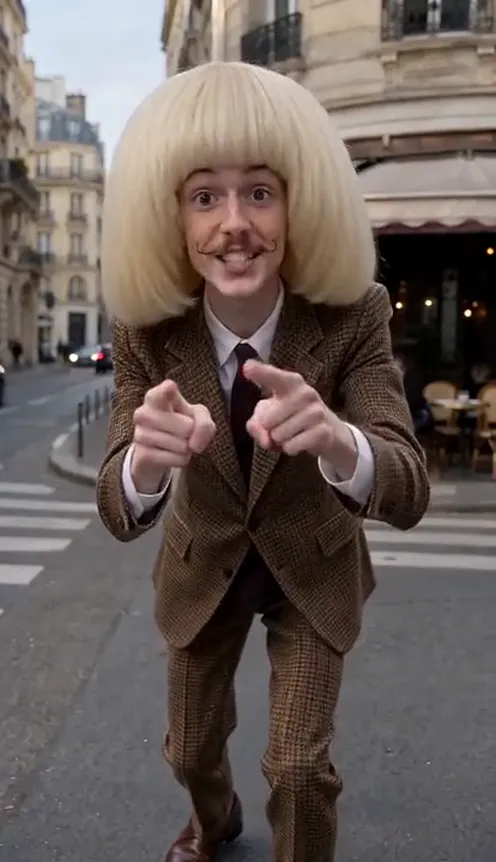
Where the angry dance filter comes from#
The trend started with a CapCut template called "Angry Dance Filter". In late October 2026 it passed 23,000 uses as people posted their own takes on TikTok: one person, one phone propped up or held at arm's length, and a short mock-angry routine aimed straight at the camera.
The original clips are simple on purpose. There are no cuts, no costumes and no fancy set. It is a backyard, a living room or a bedroom, and the whole joke is the attitude.
Why it went viral#
- Fake anger is funny. Scolding the camera with a huge grin reads as playful, never mean.
- Gestures everyone knows. Finger wag, "talk to the hand", the shrug, the hair toss. You do not need to be a dancer.
- It talks to the viewer. Every move is aimed at the lens, so it feels like the video is telling you off.
- Built-in caption bait. "POV: you said you'd be ready in 5 minutes" writes itself.
- Anyone can do it. Your mum, your best friend, your dog, you.
The dance, second by second#
Here is what the 14-second version you get looks like. It is one continuous handheld phone shot, like the original:
- 0–1s: The walk-up. You step toward the camera with a cheeky look, arms swinging.
- 1–4s: The scolding. You lean in, jab your index finger at the lens and wag the other hand like you are telling someone off.
- 4–5s: Talk to the hand. One open palm shoots up to the lens while you turn your head away.
- 5–7s: Double point. Both index fingers point at the camera and bounce on the beat, eyebrows up.
- 7–10s: Laugh, shrug, hmm. You lean to the side laughing, shrug with both palms up, then put a hand on your chin for a dramatic "hmm".
- 10–13s: Lean in, hair toss. You lean close to the lens, step back, turn sideways with a hand on your hip and toss your head.
- 13–14s: The gasp. You turn back with a mock-shocked open mouth and end looking into the lens.
You wear the outfit from your photo, and the background of your photo stays as the setting. The clip comes out silent; add the trending sound in TikTok or CapCut when you post. The example on our page plays it as a preview only.
Step by step: how to do the angry dance filter with AI#
- Open the template. Go to the AI Angry Dance Filter page and sign in.
- Upload one photo. A clear photo of one person, face visible. Full-body or head-to-knees works best.
- Pick the aspect ratio. 9:16 for TikTok, Reels and Shorts, or 16:9 for YouTube.
- Pick a quality. Standard 480p or 720p is enough for social. Higher tiers give more detail and cost more.
- Generate. No prompt to write: every move and its timing are already set. Rendering usually takes a few minutes.
- Add a sound and post. You get a silent 14-second MP4. Add the trending sound in TikTok or CapCut and post it.
Picking a photo that works#
| Works well | Causes trouble |
|---|---|
| One person, face clearly visible | Group photos where the face is tiny |
| Full body or head to knees in frame | Close-ups that crop off the arms and hands |
| Even light, sharp focus | Heavy filters, very dark or blurry photos |
| Hands free and visible | Holding a drink, a bag or a phone |
| A background you like | Busy crowds behind you |
- Your outfit stays yours. Nothing is swapped: you dance in what you wear in the photo.
- Your background is the stage. A backyard, a bedroom or a plain wall all work; a studio backdrop stays a studio backdrop.
- Pets can try too. Your pet stands up on its hind legs and does the pointing, palm-out and shrug moves with its front paws. A clear full-body photo of a single pet works best.
Note
Photos that appear to show public figures, including actors, singers and influencers, are rejected before any credits are charged. Use photos of yourself or of friends who agreed to be in your video.
Ideas for your post#
- The classic. "POV: you told me you'd be ready in 5 minutes" over the clip.
- The roommate callout. "Me when someone eats my leftovers" (make it of your roommate, with their permission).
- The pet version. Your cat or dog scolding you for being late with dinner.
- A dance duo of posts. Follow it with the sweeter AI I'm So In Love With You Dance for a mood swing.
- Hashtags. #angrydancefilter, #angrydance and #capcuttemplate put your clip where people are already watching.
AI Angry Dance Filter vs. the CapCut template#
The CapCut template is quick, but you still have to film yourself doing the dance, in the CapCut app, and get every move on the beat.
The AI Angry Dance Filter template makes the whole dance from one photo in the browser:
- No filming, no rehearsing. One photo in, a finished dance out.
- No app to install. It runs on your phone or computer.
- Still you. Your face, outfit and background stay the same in every frame.
- The real routine. Finger jabs, "talk to the hand", double point, shrug, chin, hair toss and the gasp, timed like the viral original.
- Two aspect ratios. 9:16 vertical or 16:9 widescreen.
- No watermark. The file is clean and silent, ready for a sound from the platform library.
How much it costs#
A Standard 720p AI Angry Dance Filter video costs 234 credits; 480p costs 113. Higher tiers cost more, and the exact price is always shown next to the Generate button before you start. Credit packs are one-time payments, not a subscription. They start at $9.90 for 600 credits and never expire. If a generation fails, the credits go straight back to your balance. See the pricing page for details.
Frequently asked questions#
What is the angry dance filter?#
A TikTok trend from the CapCut "Angry Dance Filter" template, where people do a playful, mock-angry dance at the phone camera. The AI version on Viberot makes the full 14-second dance with you as the dancer, from one photo.
How much does it cost?#
113 credits at 480p and 234 credits at Standard 720p. The price is shown before you generate.
How many photos do I need?#
- One clear photo of one person, ideally full body.
Will I keep my clothes and background?#
Yes. You dance in the outfit from your photo, and the background of your photo stays as the setting.
Does it include the original song?#
No. The video is silent, with no song and no AI audio. The music in the example on the page is a preview only. Add the trending sound in TikTok or CapCut when you post, so it plays under the platform's licence. Audio in a downloaded file is never a music licence. Follow your platform's rules on labelling AI-generated content.
Can I use my pet?#
You can try. A clear full-body photo of a single pet works best; it stands on its hind legs and does the moves with its front paws.
Can I make it with a celebrity photo?#
No. Photos that appear to show public figures are blocked before any credits are charged, and explicit images are always blocked.
Tell the camera off
Upload one photo and get your 14-second AI angry dance filter video, ready to post.
From 113 credits · failed videos refunded · sin suscripción