How to Do the AI Gangnam Style Trend With Your Friends (From 3 Photos)
How to do the AI Gangnam Style trend: where the night-out selfie vlog comes from, the shot second by second, and how three photos of you and friends make it.
The AI Gangnam Style trend is not the horse dance. It's a selfie vlog filmed with the front camera on a lit-up city square at night: one friend holds the phone and lip-syncs into the lens, two friends goof around behind, the camera whips over to give each of them a solo close-up, then swings back for a finger-point at the lens. This guide covers where it comes from, why it's everywhere right now, and how to make a 14-second version starring you and two friends from 3 photos with the AI Gangnam Style generator on Viberot.
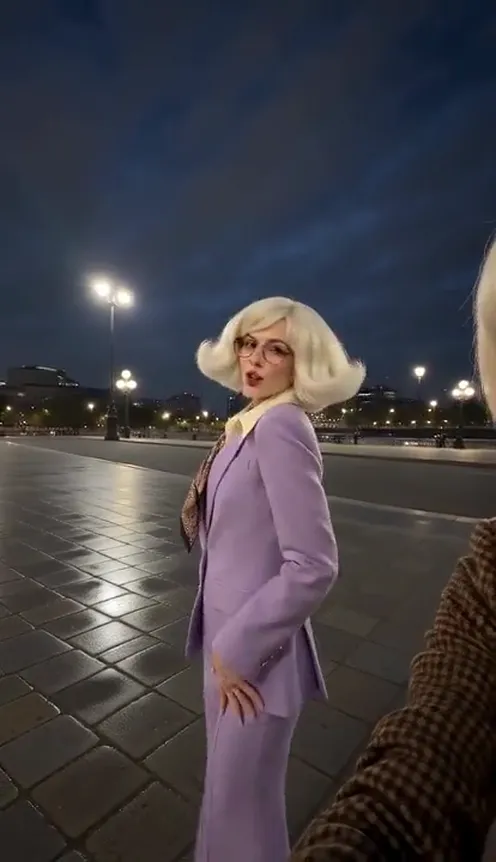
Where the AI Gangnam Style trend comes from#
It started with a real clip. In early October 2026 a group of three friends posted a short night-out selfie video filmed on the street, set to the "Oppa Gangnam Style" chorus. It passed millions of views on TikTok within days, and the sound behind it now sits under hundreds of thousands of videos.
From around October 19, AI templates turned it into a remake format: people dropped in movie trios, cartoon characters and their own friend groups, always keeping the same structure. Group selfie, a quick close-up of each friend, back to the group.
Why it went viral#
- It's a friend-group trend. You need three people, so every post tags two friends, and those friends make their own.
- It's casual. No choreography to learn, just lip-syncing, laughing and hair flips. That's why the remakes look so easy.
- Everyone gets a moment. The whip pans give each friend their own solo close-up, so nobody is just the background.
- The song is instantly familiar. Everyone knows the chorus, and pairing it with a low-key night vlog instead of the horse dance is the twist.
- It remixes well. Movie trios, sports teams, your office trio: the format works with any three faces.
The shot, second by second#
Every clip follows the same structure. Here is the 14-second version you get:
- 0–1.5s: The group selfie. Wide front-camera shot. The friend holding the phone laughs into the lens, the two behind throw their hands up.
- 1.5–5s: The lip-sync. The phone holder leans in close and lip-syncs along to the beat while the other two dance in the background.
- 5–8s: Solo close-up #1. The camera whips left to the friend at the back. They flick their hair, wink and gesture to the camera.
- 8–11.5s: Solo close-up #2. Whip right to the third friend for a hair swing and a "call me" gesture.
- 11.5s–end: The finger-point. Back to the selfie, a finger poked right at the lens, everyone laughing.
Make it vertical 9:16 for TikTok, Reels and Shorts, or widescreen 16:9 like the original vlog.
Step by step: how to do the AI Gangnam Style trend#
- Open the template. Go to the AI Gangnam Style page and sign in.
- Upload the selfie filmer. The first photo is the friend who holds the phone in front.
- Upload the two friends in the back. The second photo goes back left, the third back right. Each gets a solo close-up.
- Pick the aspect ratio and quality. 9:16 for TikTok and Reels. Standard 480p or 720p is enough for social; higher tiers give more detail and cost more.
- Generate. You don't need to write a prompt. The night square, the whip pans and the timing are already set. Rendering usually takes a few minutes.
- Add the sound and post. The video comes without music. Add the trending Gangnam Style sound inside TikTok, Reels or Shorts so it stays in sync with everyone else's.
Picking photos that work#
| Works well | Causes trouble |
|---|---|
| One person per photo, face clearly visible | Group photos where the face is tiny |
| Front-facing, eyes open, good light | Sunglasses, masks, faces turned away |
| Head and shoulders down to the waist | Only a hand or the back of a head |
| Three different people | Heavy filters, very dark or blurry photos |
- Put the most expressive friend in front. The first photo gets the most screen time, lip-syncing right into the lens.
- Outfits stay. Everyone wears the clothes from their own photo, so a matching squad look or three costumes make it funnier.
- Faces stay put. Each photo has a fixed spot (front, back left, back right), so the faces don't swap halfway through.
Note
Photos that appear to show public figures or celebrities are rejected before any credits are charged. Use photos of yourself and friends who agreed to be in your video.
Ideas for your post#
- Tag the trio. Post it with "us every Friday" and tag both friends. They'll repost it.
- The unexpected trio. Your parents and grandma, your three roommates, or your work team on a night out.
- Costume night. Make it in Halloween costumes for a spooky-season version.
- Before the night out. Caption it "pregame energy" or "the group chat at 11pm".
- Use the hashtags. #gangnamstyle, #gangnamstyletrend and #aitrend put your clip next to the ones people are already watching.
AI Gangnam Style vs. CapCut templates#
The CapCut templates paste your face onto the template's footage, so the bodies, outfits and moves belong to someone else, and you need the app and the template link.
The AI Gangnam Style generator makes a new video around your photos:
- No app to install. It runs in the browser on your phone or computer.
- Made in one go. Upload, generate, download. No editing timeline.
- Your own clothes. All three of you show up in the outfits from your photos. The original footage is not reused.
- Two aspect ratios. 9:16 vertical or 16:9 widescreen, picked before you generate.
How much it costs#
A Standard 720p AI Gangnam Style video costs 234 credits; 480p costs 113. Higher tiers cost more, and the exact price is always shown next to the Generate button before you start. Credit packs are one-time payments, not a subscription. They start at $9.90 for 600 credits and never expire. If a generation fails, the credits go straight back to your balance. See the pricing page for details.
Frequently asked questions#
Is this the horse dance?#
No. The current trend is a three-friend selfie vlog at night with lip-syncing and solo close-ups, not the horse-dance routine from the music video.
How much does it cost?#
113 credits at 480p and 234 credits at Standard 720p. The price is shown before you generate.
How many photos do I need?#
3, one for each friend: the one holding the phone, the friend back left and the friend back right.
Does it include the original song?#
No. The video comes without music; add the trending Gangnam Style sound in TikTok, Reels or Shorts when you post. This is an independent tool, not affiliated with PSY, YG Entertainment, CapCut or the creators of the original posts, and it does not use any artist's voice or likeness. Follow your platform's rules on labelling AI-generated content.
Can I use my pet?#
Not in this template. It's built for three people lip-syncing to the camera.
How long is the video?#
14 seconds, vertical 9:16 by default or 16:9 if you choose it.
Which photos are rejected?#
Photos that appear to show public figures or celebrities are blocked before any credits are charged, and explicit images are always blocked. Uploading your own video is not supported.
Are there other friend-group templates like this?#
Yes. Try the Gas Station Dance AI for another three-friend trend made from your photos.
Grab two friends and hit the square
Upload three photos and get your own night-out selfie vlog — lip-sync, whip pans and a close-up for everyone.
From 113 credits · failed videos refunded · sin suscripción